# Optiwork — Full content for LLMs
> Optiwork is a unified workspace SaaS by Optidata that replaces email, chat, drive, docs, calendar, and project management with one platform at $8/user/month. Built as an alternative to stitching together Microsoft 365, Slack, and Dropbox, with LGPD compliance and SOC 2 Type II controls included.
This file concatenates the canonical English-language content of work.optidata.com (pricing, blog, key product pages) as one markdown bundle for AI / LLM consumption. Source-of-truth pages remain at:
- Homepage: https://work.optidata.com/
- Pricing (HTML): https://work.optidata.com/pricing/
- Pricing (markdown): https://work.optidata.com/pricing.md
- Free trial: https://work.optidata.com/free-trial/
- Contact: https://work.optidata.com/contact/
- AI crawler index: https://work.optidata.com/llms.txt
Localized variants:
- Português (Brasil): https://work.optidata.com/br/ — pricing markdown at https://work.optidata.com/br/pricing.md
- Español: https://work.optidata.com/es/ — pricing markdown at https://work.optidata.com/es/pricing.md
---
# Optiwork — A new way of working for your company
> A complete corporate environment with intelligent communication, traceability, governance, and enterprise resources to make your company more efficient.
A single environment that centralizes communication, files, processes, and decisions, ensuring control, traceability, and security, while eliminating tool fragmentation and increasing operational productivity.
## All in one place
- **All in one place.** Email, chat, drive, projects, and 20+ apps.
- **Built-in governance.** Traceability, control, and enterprise security.
## What Optiwork does
Instead of depending on isolated tools, work happens in an integrated environment where communication, projects, documents, processes, and decisions stay connected.
- **Unified communication.** Chat, email, and video calls integrated into work context.
- **Project management.** Tasks, deadlines, and deliverables with end-to-end visibility.
- **Documents & knowledge.** Institutional knowledge base with control and traceability.
- **Processes & automation.** Standardized workflows with intelligent automation.
- **Governance & security.** Access control, auditing, and compliance built in.
## The four pillars of work in one environment
Optiwork brings together the main pillars of modern work in a single platform, connecting communication, knowledge, execution, and governance.
### Institutional Communication
Centralize your company's internal and external communication.
- Corporate chat with channels
- Smart meeting scheduling
- Automatic call summaries
- Corporate email
- Internal social for announcements
- Centralized interaction history
### Knowledge & Documentation
Turn information into institutional memory.
- Institutional knowledge base
- Process documentation
- Corporate file organization
- Fast enterprise-wide search
### Execution & Operations
Organize how work happens day to day.
- Projects and tasks
- Internal and external forms
- Connected workflows
- Cross-team execution tracking
- Process and workflow automation
### Governance, Security & Control
Ensure visibility and control over operations.
- Access management
- Audit and traceability
- Decision and interaction history
- Approvals and institutional records
## The problem Optiwork solves
Most companies believe their work is organized. In practice, it happens in fragments.
- **Fragmented communication.** Messages spread across email, WhatsApp, and meetings. Discussions happen every day but rarely leave a trace.
- **History tied to people.** Every client interaction is linked to individuals, not the company. When someone leaves, the history leaves too.
- **Invisible costs growing.** Multiple licenses, multiple vendors, multiple contracts. A stack of tools that increases cost per employee and operational complexity.
> When information doesn't live in the company, it lives in people. And that becomes a risk.
Tools will keep existing. New channels will keep emerging. And work complexity will keep growing. The real challenge is organizing how work happens.
- Communication with context
- Execution with organization
- Processes with traceability
- Decisions as institutional memory
> It's not about having fewer tools. It's about having an environment where work connects.
## Measurable impact
Companies using Optiwork report measurable gains in productivity, cost reduction, and operational clarity across teams.
- **27% less time searching for internal information.** With centralized communication, documents, and decisions, context stops getting lost between tools.
- **41% faster to find history and context.** Everything is recorded, searchable, and accessible to those who need it.
- **37% less time on internal alignments.** Fewer unnecessary meetings, less rework, and more clarity in execution.
- **84% savings on licenses and isolated tools.** Companies typically pay multiple licenses to handle communication, management, documents, and processes.
*Based on platform usage analysis and market benchmarks for productivity and collaboration.*
## Used by thousands of professionals
**+3,743 professionals use Optiwork to structure and govern their work.**
Real cases show gains in productivity, governance, and reduced operational complexity.
### Grupo Tozzo
> "Today, with Optiwork, we can block every access in minutes, if not seconds."
>
> **Felipe Tozzo**, Commercial Director
Simpler, safer, and more agile operations.
### Contal
> "Today all of our data is in the cloud, with 100% accuracy."
>
> **Carlos Ludwig**, Director and Partner
More visibility, less rework, and more operational control.
## Pricing
**Pro: $8 / user / month** — replaces a typical $93+/user/month legacy stack of email, chat, video, drive, projects, calendar, and more.
**Enterprise: Custom** — for organizations needing advanced security (SSO, LDAP/AD), compliance, dedicated CSM, and white-glove onboarding.
[Full pricing details and feature comparison](https://work.optidata.com/pricing.md)
## Get started
- [Free trial — no credit card required](https://work.optidata.com/free-trial/)
- [Schedule a demo](https://work.optidata.com/contact/)
## Related machine-readable resources
- [Canonical homepage (HTML)](https://work.optidata.com/)
- [Full pricing in markdown](https://work.optidata.com/pricing.md)
- [Pricing page (HTML)](https://work.optidata.com/pricing/)
- [About Optidata in markdown](https://work.optidata.com/about.md)
- [AI-crawler index (llms.txt)](https://work.optidata.com/llms.txt)
- [Concatenated full content (llms-full.txt)](https://work.optidata.com/llms-full.txt)
---
# About Optiwork, Built by Optidata, since 2010
> Optiwork is built by Optidata: a self-funded cloud platform serving 7,000+ companies, 25,000+ servers, 15+ petabytes across 5 data centers.
## Why Optiwork exists
**We believe a company's work should live in the organization not inside people's heads.**
Optiwork was born from a simple observation: as companies grow, their work gets scattered. Files in one place, communication in another, projects in a third. Every team builds its own stack. And before long, nobody has a complete view of what's actually happening.
That's not just a tooling problem. It's a structural problem, one that affects management, execution, governance, and ultimately growth.
Optiwork is a unified corporate environment where planning, execution, communication, and documentation happen in one place. With control, traceability, and institutional memory built in. Not another tool to add to the stack, the environment that replaces the need for so many tools in the first place.
Our vision is that a company's information and knowledge should belong to the organization, not to the individuals who happen to hold it today. That's how we elevate business, through infrastructure that organizes not just servers, but work itself.
## Who builds Optiwork
**Optiwork is built by Optidata.**
*A cloud infrastructure and enterprise platform company.*
It was founded in 2010 by Darlan Segalin together with two partners, whose shares Darlan later acquired, taking full ownership of the business. In 2022, his brother Liandro Segalin joined as a partner.
What started as a small IT consultancy became one of the largest independent cloud platforms in its market. Today, Optidata serves 7,000+ companies, manages 25,000+ servers, and processes over 15 petabytes of data across 5 proprietary data center structures, all self-funded, without external investors.
The company has grown 50% year over year since its pivot to cloud. That independence shapes everything: long-term thinking, client-first decisions, and full control over infrastructure and roadmap.
*In 2014, Darlan and Liandro founded a separate venture, Amplimed, with a specific goal: to learn how to build software.*
At that point, Optidata was a cloud infrastructure company. It didn't develop software. Amplimed would change that. They built a healthcare SaaS running entirely on Optidata's cloud, and over the years turned it into the largest ERP in the healthcare market. In 2021, Amplimed was acquired by Grupo RD (Raia Drogasil), one of the largest retail corporations in Latin America, serving 20,000+ healthcare professionals and 9 million patients at the time of the acquisition.
But the real legacy of Amplimed wasn't the exit. It was the know-how. Every lesson Darlan and Liandro learned, building products, designing interfaces, shipping features, scaling under real load, became the foundation for everything that came next. Optiwork is the direct result of that experience. Built on the software expertise earned through Amplimed, running on infrastructure Optidata has refined for over 15 years.
### Optidata at a glance
- **7,000+** companies served
- **25,000+** servers managed
- **15+ PB** of data processed
- **5** proprietary data centers
## Inside Optidata
**A bootstrapped company in motion every day.**
Engineers, SREs, support, and operations across two countries and three offices, running cloud infrastructure for 7,000+ companies.
## Timeline — from a two-person consultancy to a global cloud platform
Without a single dollar from investors.
### 2010 — Founded
Darlan Segalin founds Optidata as an IT consultancy together with two partners. Over time, Darlan acquires their shares and takes full ownership. No outside capital. Just the work.
### 2012 — The cloud pivot
After seeing companies struggle with cloud providers that didn't understand their reality, foreign billing, distant support, overseas infrastructure, Optidata bets everything on building an independent, enterprise-grade cloud platform.
### 2014 — Amplimed: the software bet
Darlan and Liandro found Amplimed, not to build a business, but to learn how to build software. Until that moment, Optidata was infrastructure, not a software company. Amplimed changed that. Running entirely on Optidata's cloud, it eventually became the largest ERP in the healthcare market.
### 2018 — Scale
Optidata crosses 3,000 clients. Growth rate: 50% year over year, every year. Still bootstrapped. The cloud now runs ERPs, databases, and production workloads for companies across multiple industries.
### 2021 — Amplimed acquired
Amplimed is acquired by Grupo RD (Raia Drogasil), one of the largest retail corporations in Latin America. At that point: 20,000+ healthcare professionals, 3,000 clinics, 9 million patients. But the real legacy wasn't the exit, it was the software development expertise now living inside the team that builds Optidata.
### 2022 — Liandro joins. Optiwork is born.
Liandro Segalin officially becomes a partner at Optidata. Together, the brothers channel everything they learned building Amplimed into a new product: Optiwork, a unified corporate workplace platform. Optidata stops being just infrastructure, it becomes a software company too.
### 2024 — International expansion
Optidata opens offices in the United States and deploys cloud regions across two countries. R$30M invested in infrastructure expansion, R&D, and international operations.
### Now — 100% proprietary software
7,000+ companies. 15+ petabytes. 5 data center structures. 3 offices across 2 countries. Every product in the ecosystem built in-house, running on infrastructure we own end to end. Still founder-led. Still self-funded. Still elevating business with cloud.
### Next — AI-native infrastructure
We're building AI into the core of how our platforms operate, not as an add-on, but as a native layer. On Optidata Cloud, that means intelligent monitoring, predictive scaling, and automated incident response. On Optiwork, it means an AI co-pilot that actually has context, because it sits on top of your company's real data, decisions, and communication history. AI only works when the foundation is organized. We've spent 15 years building that foundation.
## Security — SOC 2 Type II
**Security audited end to end. Not just our servers, our entire operation.**
Optidata holds a SOC 2 Type II certification, one of the most recognized security standards in the industry, based on AICPA criteria.
The audit didn't just evaluate our cloud infrastructure. It assessed our internal processes, people management, financial controls, and corporate governance over an extended period. Security, availability, confidentiality, and data integrity, all independently verified.
The same standards that protect the data of 7,000+ cloud clients also protect every file, message, and document inside Optiwork.
### Key points
- Independent audit covering infrastructure, processes, and governance
- Continuous evaluation over months, not a point-in-time snapshot
- Security, availability, confidentiality, and data integrity verified
- Accelerates vendor approval and compliance requirements
- Aligns with ISO 27001, LGPD, and international data protection standards
### Certifications
- SOC 2 Type II
- Tier III
- ISO 27001
- PCI-DSS
## Two platforms, one mission
Elevating business with cloud, through the infrastructure that powers your systems, and the environment where your team's work happens.
### Optiwork
A unified corporate environment where work stops living with individuals and starts living with the organization. Communication, execution, knowledge, and governance, in one place.
### Optidata Cloud
Smart cloud for companies that never stop growing. Enterprise-grade infrastructure with human support, active security, and cost predictability, interconnected across two regions by default.
> Elevating business with cloud.
15 years of independent cloud infrastructure. 7,000+ companies served. Built by people who understand what it takes to scale, because they've done it themselves.
## Related machine-readable resources
- [Canonical About page (HTML)](https://work.optidata.com/about/)
- [Optiwork product overview in markdown](https://work.optidata.com/index.md)
- [Pricing in markdown](https://work.optidata.com/pricing.md)
- [AI-crawler index (llms.txt)](https://work.optidata.com/llms.txt)
- [Concatenated full content (llms-full.txt)](https://work.optidata.com/llms-full.txt)
---
# Optiwork Pricing
> Stop paying for separate tools. One platform. One price.
The average company spends $101+/user/month stitching together email, chat, video, storage, projects, and more. Optiwork replaces all of them with governance, security, and 5TB of storage included, for a fraction of the cost.
## Plans
| Plan | Price | Best for |
| --- | --- | --- |
| Pro | $8 / user/month | Teams of 1–1,000 users |
| Enterprise | Custom | Organizations needing advanced security, compliance, dedicated CSM |
## What replaces what
Compared to a typical legacy stack:
| Legacy tool | Cost / user / month | Replaced by Optiwork |
| --- | --- | --- |
| Traditional Workspace (Google Workspace and Microsoft 365) | $14 | Mail + Calendar |
| Slack | $8.75 | Talk |
| Zoom | $13.33 | Videocall |
| Monday.com | $12 | Projects |
| Notion | $10 | Papers |
| Dropbox Business | $15 | Enterprise Drive |
| Calendly | $20 | Scheduling |
**Total legacy stack cost:** $93.08 / user/month.
**Optiwork all-in:** $8 / user/month — Save 91% for one integrated platform.
## Features by category
Every feature is included in Pro from day one. No paywalls, no feature gates. Enterprise adds dedicated infrastructure, advanced security, and white-glove onboarding.
### Email
- Individual and shared inboxes
- Unlimited email aliases
- Automatic filters and rules
- Customizable email signature
- Calendar integration
- Advanced email search
### Drive
- Workspace storage — Pro: 5TB · Enterprise: 5TB+
- Shared folders and granular permissions
- File versioning
- Preview of 200+ formats
- External sharing with protected links
- Trash with 30-day recovery
### Docs, Sheets & Slides
- Real-time collaborative editor
- Spreadsheets with advanced formulas
- Presentations with professional templates
- Inline comments and suggestions
- Export to PDF, DOCX, XLSX, PPTX
- Complete version history
### Calendar
- Personal and team calendars
- Meeting scheduling with availability
- Integration with VideoCall and TeamChat
- Recurring events and reminders
- External calendar synchronization
- Day, week, and month views
### TeamChat
- Public and private channels
- Direct and group messages
- Inline file sharing
- Threads for organization
- Smart mentions and notifications
- Complete history search
### Baseline
- Company news feed
- Rich media posts
- Reactions and comments
- Internal groups and communities
- Quick polls and surveys
### Social
- Employee profiles
- Company directory
- Visual org chart
- Status and availability
### Forms
- Drag-and-drop form builder
- Conditional logic
- Reports and response export
- Pre-built templates
- Integration with Projects and Drive
### Projects
- Kanban, List, Gantt, and Calendar views
- Subtasks and dependencies
- Workflow automations
- Custom fields
- Time tracking
- Project reports and dashboards
### Papers (Wiki)
- Wiki-style collaborative documentation
- Tree-structured page organization
- Documentation templates
- Mentions and cross-page links
- Complete edit history
### Security & Governance
- Two-factor authentication (2FA)
- SSO (SAML/OAuth) *(Enterprise only)*
- LDAP & Active Directory integration *(Enterprise only)*
- Audit logs
- Data retention policies
- Device management
- Compliance (LGPD)
### Contacts
- Corporate contact management
- Bulk import/export
- Tags and segmentation
- Integration with Email and Calendar
### Approvals
- Customizable approval workflows
- Chain approvals (multi-level)
- Automatic notifications
- Approval history
### Mobile
- Native iOS and Android apps
- Push notifications
- Offline document access
- Camera for scanning
## Enterprise
Built for organizations that demand advanced security, compliance, and white-glove onboarding at scale.
What Enterprise adds on top of Pro:
- Everything in Pro included
- Dedicated onboarding & migration
- Custom SLA & priority support
- SSO & advanced security (SAML/OAuth)
- LDAP, Active Directory & more
- Dedicated Account Manager
Contact sales: https://work.optidata.com/contact/
## Pricing philosophy
- **All features from day one.** Every feature is included. No paywalls, no feature gates, no tiers to unlock.
- **Transparent pricing.** Published rates for everyone. What you see on this page is exactly what you pay.
- **No forced upsells.** We invest in product, not sales pressure. Your price stays fair as you grow.
## Get started
Start a free trial: https://work.optidata.com/free-trial/
No credit card required.
## Related machine-readable resources
- [Canonical pricing page (HTML)](https://work.optidata.com/pricing/)
- [Optiwork home](https://work.optidata.com/)
- [Free trial signup](https://work.optidata.com/free-trial/)
- [Contact / book a demo](https://work.optidata.com/contact/)
- [AI-crawler index (llms.txt)](https://work.optidata.com/llms.txt)
---
# Blog (English posts)
# Optiwork in motion: everything that changed from May 2025 to March 2026
*Published: 2026-04-17T00:00:00.000Z · Author: Redação Optidata · Category: Novidades*
Source: https://work.optidata.com/blog/atualizacoes-optiwork-2025-2026
> A roundup of the main Optiwork updates over the past 11 months: security, approvals, mail, projects, mobile, and much more.
**TL;DR**
- Security Center with company-wide global 2FA and password controls
- Complete document approval flow, including external approval and expiration dates
- Mail on mobile, multiple mailboxes, and converting an email into a task
- Projects with recurring tasks, templates, task relationships, and custom fields
- SmartBook: public scheduling integrated with Calendar, configurable links and automatic meeting-link generation
- Approvals available on mobile, with tracking from anywhere
---
Over the past 11 months, Optiwork has gone through one of its most intense evolution cycles. New modules, new features, structural improvements, and a meaningful expansion of what you can do inside the platform.
This article gathers the main updates from May 2025 to March 2026, organized by topic for easier reading. If you already use Optiwork, treat it as a guide to what's now available — some of it you may not have noticed yet. If you're still evaluating the platform, it's a sample of how fast the product is moving.
---
## 1. Security and governance
### Security Center
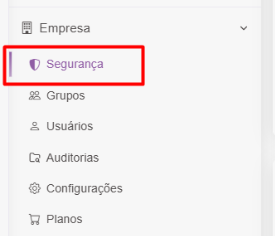
In March 2025, Optiwork launched the Security Center: a dedicated dashboard where administrators manage the company's access policy from a single place.
From there, you can enforce mandatory 2FA for every user in the base. Anyone who hasn't configured 2FA yet can still log in, but is redirected straight to the security page to register a device before continuing. You can also request password resets for specific users.
### Expanded auditing
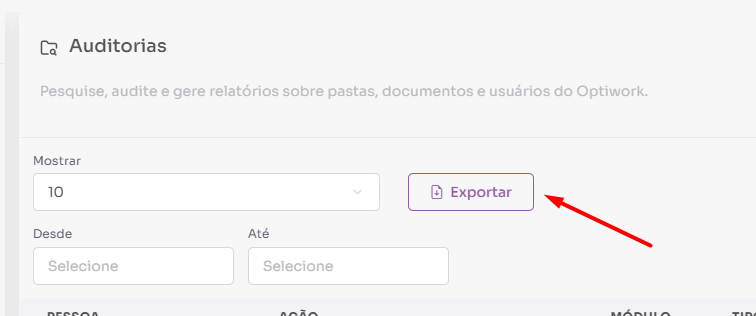
The Optiwork audit center grew its scope substantially over this period. Beyond file access logging, the following are now audited:
- Corporate folders: creation, renaming, deletion, and permission management
- Groups: creation, editing, deletion, and adding or removing members
- Bulk downloads: every file in a batch download generates its own record
- Drive files used as attachments in Chat, Mail, Projects, and Social
In July 2025, we added the ability to export audit reports as CSV, with filters by user, action, period, and file type. This makes it easier to account for usage in both internal audits and LGPD-compliance requirements.
### Download and permission control
Starting in August 2025, users with view-only access — whether through direct sharing or work folders — can no longer download files. What's downloadable is now part of the permission policy itself, not just a manual restriction.
External authenticator support was also added for 2FA, and in March 2026 administrators gained the ability to configure the 2FA revalidation interval: from 1 day up to 1 month, depending on the company's security policy.
---
## 2. Document approval
The document approval flow was one of the most heavily evolved modules during this period. What started as a basic feature in March 2025 has grown into a complete validation process with full traceability.
### From basic to complete
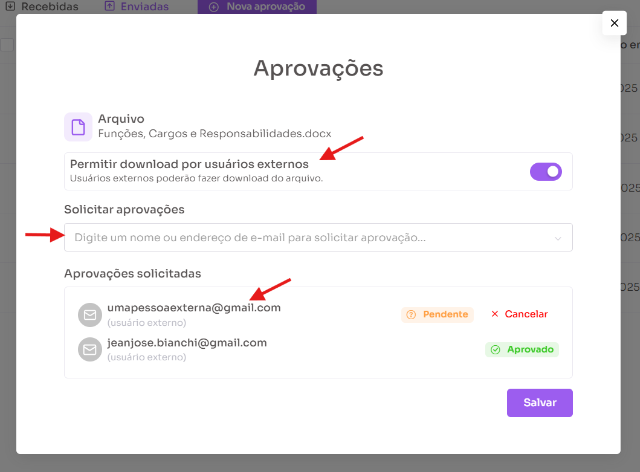
In March 2025, document approval was launched: the ability to request validation from other users, with visible status (Pending, Approved, or Rejected) and notifications in the notification center for everyone involved.
Over the following months, the flow gained:
- **External approval:** people outside the company receive an email, access the document, and approve or reject it with code-based verification — no Optiwork account required
- **Approval note:** an extra field for the requester to include a specific message for the approvers
- **Expiration date:** sets a validity window for the request, with automatic removal of granted access once it expires
- **Notes column on the approvals page:** visible for both received and sent requests
### Automatic locking during approvals
In March 2026, automatic locking of documents with pending approvals was introduced. While there are open requests, the file is locked for editing, and the lock is recorded in the document's history and audit log.
If the document is modified after being submitted for approval, approvers who haven't responded yet receive a modification indicator and can only reject — not approve — until the requester resubmits the approval with the updated version.

### Approvals on mobile
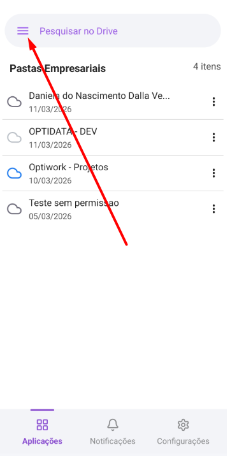
In March 2026, document approval landed on the mobile app. You can view received and sent requests, follow each approver's status, and create new requests directly from the file's context menu.
---
## 3. Mail
### Multiple mailboxes
In March 2026, one of the most requested Mail updates arrived: the ability to manage multiple email addresses inside a single Optiwork account. You can switch between different inboxes without changing logins or jumping between separate workspaces.
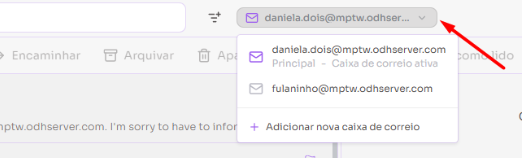
### Turn an email into a task
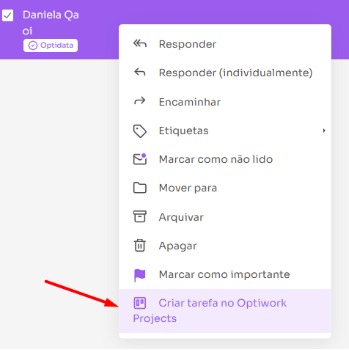
Also in March 2026, emails can be converted into Projects tasks with a single click. Right-click any email and "Create task in Optiwork Projects" appears in the menu. The email subject becomes the task title, the body becomes the description, with a direct link back to the original message.
### Other Mail improvements
Throughout the period, Mail picked up a series of features that make day-to-day use more efficient:
- **Read receipts:** when sending an email, you can request open confirmation from the recipient (May/2025)
- **Custom filters:** automatic rules for organizing the inbox (March/2025)
- **Contact shortcuts:** groups of frequent emails with a shortcut name for auto-fill in the recipient field (November/2025)
- **Email folder sharing:** folders can be shared with other users in the company for joint viewing and replying (December/2025)
- **Folder color customization:** each folder can have a color for quick identification (November/2025)
- **External link safety alert:** a warning when clicking links not verified by Optiwork (February/2025)
- **Save attachments straight to Drive** without downloading first (February/2025)
---
## 4. Projects
The projects module went through one of the most significant evolutions of the period, focused on giving teams that juggle multiple projects more structure to lean on.
### Recurring tasks
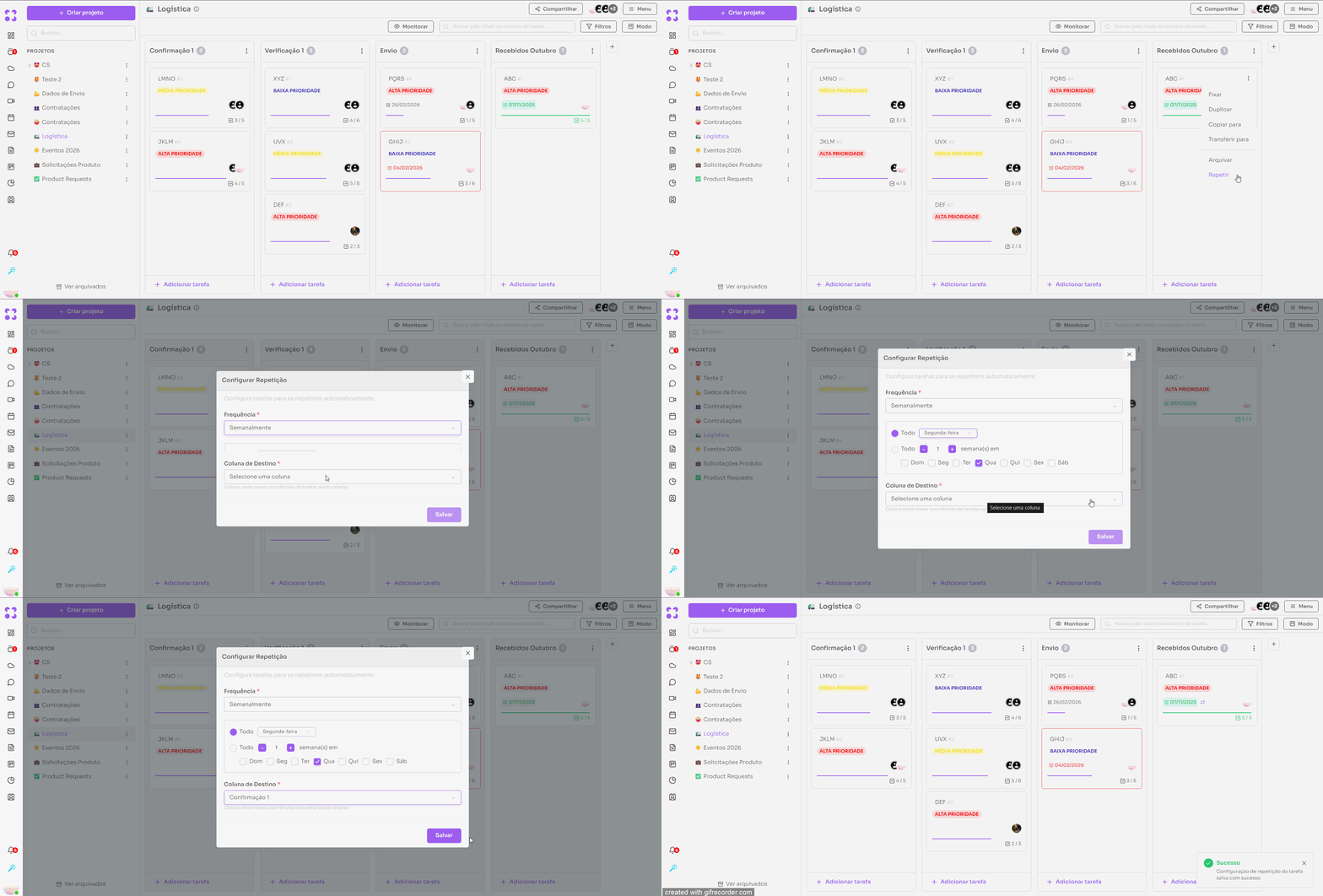
Starting in January 2026, tasks can be set to repeat automatically on defined intervals: daily, weekly, monthly, and others, following the same pattern as Calendar. New occurrences are generated without a due date and placed in the column the user defines.
### Task templates
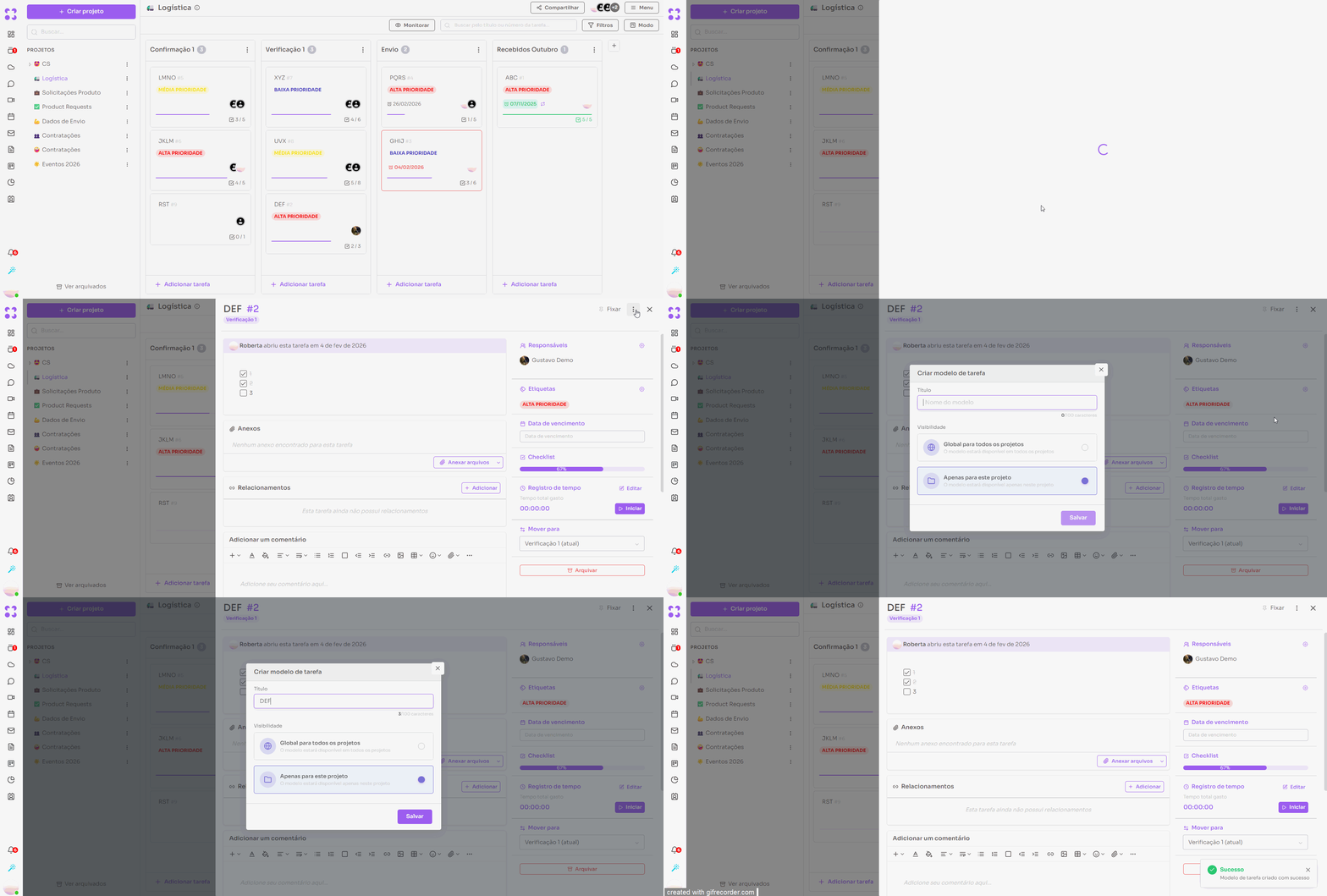
Also in January 2026, task templates arrived. You can build a standard task and save it as a template, available to every project (global) or only to the current one. When creating a new task, just pick a template and tweak whatever needs adjusting.
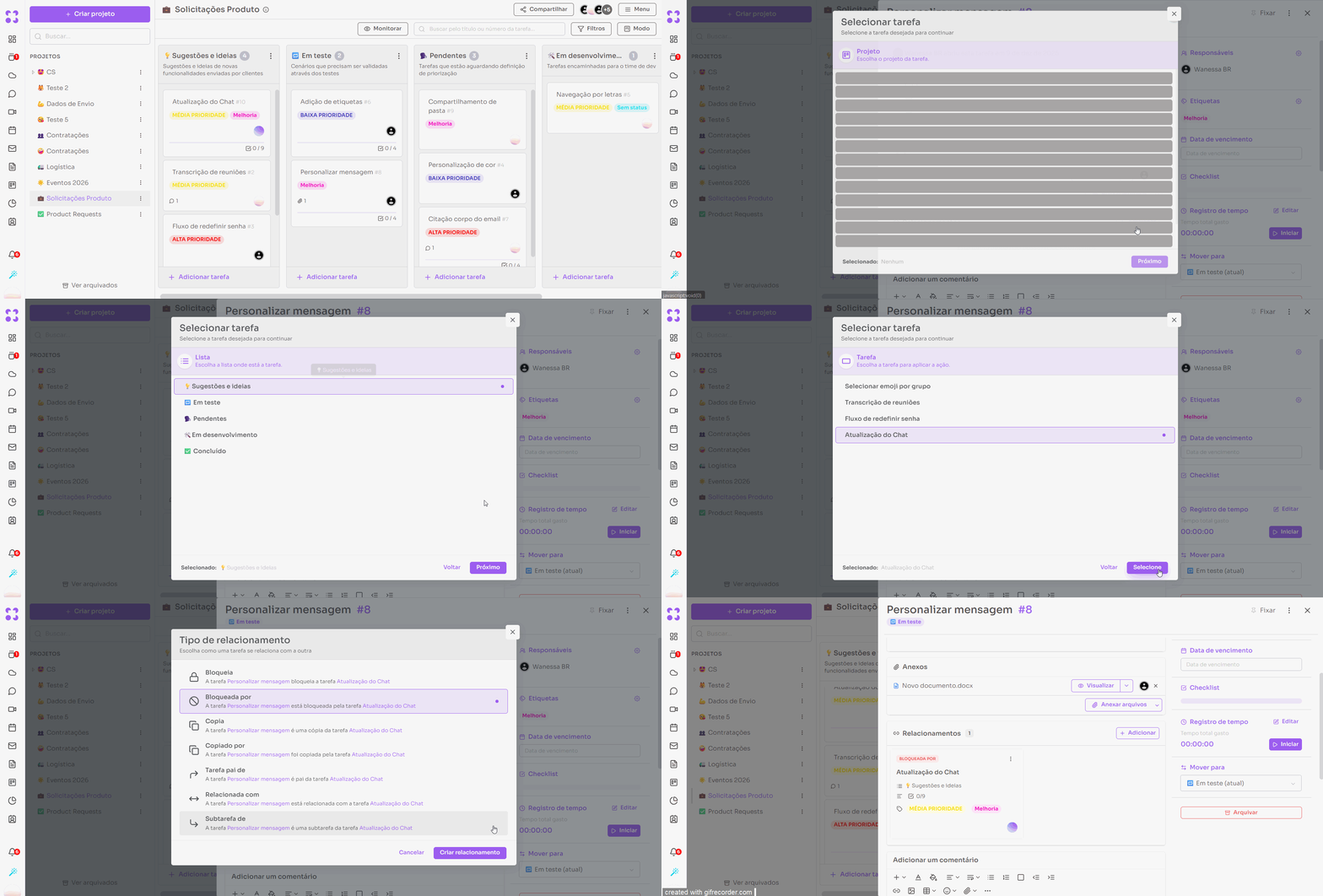
### Task relationships
Tasks can be linked to one another with different relationship types, and a task can be marked as dependent on another. This makes following complex work easier without duplicating information.
### Custom fields
Custom fields arrived in Projects in February 2026 and were expanded in March. You can create text or numeric fields, mark them as required, set a default value, and choose whether the field is global (available across all projects) or specific to one project.
### Other Projects improvements
- Duplicate and transfer tasks between projects, with destination-list selection (January/2026)
- Pin tasks to the top of Kanban columns (January/2026)
- Mention tasks using `#` inside descriptions and comments (January/2026)
- Checklists inside tasks, with automatic progress calculation (March/2026)
- "My tasks" in the side menu, listing every card assigned to the user (February/2026)
- Duplicate entire projects from the three-dot menu (December/2025)
- Public read-only project access via link (October/2025)
---
## 5. Talk (formerly Chat)
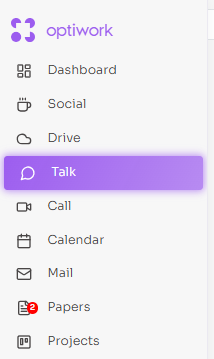
### Renamed to Talk
In March 2026, the Chat module was renamed Talk, reflecting what the module has become inside Optiwork: not just messaging, but an institutional communication environment integrated with the company's projects and processes.
### User status in conversations
Talk now shows each participant's status and custom message right inside conversations. Information updates automatically as users update their profiles, making real-time availability easier to read.
### Other Talk improvements
- **Highlights:** pin standout messages for every member of a group, with a list in the side menu (November/2025)
- **Favorite conversations:** mark conversations for quick access in the side menu (November/2025)
- **Conversation categories:** new sidebar with All, Contacts, Group, and External Groups filters (October/2025)
- **Link-based conversations:** direct access to specific conversations via shared link (January/2026)
- **Floating formatting toolbar:** appears when selecting text for fast formatting (September/2025)
- **Mark messages as read or unread** (September/2025)
---
## 6. Mobile
The Optiwork mobile app expanded substantially during this period, bringing in features that used to be web-only.
- **Mail on mobile:** in October 2025, Mail launched in the app with view, compose, filters, archiving, and Calendar invite responses
- **Approvals on mobile:** in March 2026, the full document approval flow arrived in the app
- **Mobile 2FA:** users with two-factor enabled also need to confirm when accessing from the phone (January/2026)
- **Notification center in the bottom menu**, with faster access (February/2026)
- **Initial-app configuration:** you can choose which module opens automatically when the app starts (February/2026)
- **Email folder colors on mobile**, mirroring the configuration set on the web (February/2026)
- **Email attachment listings** without having to open the message (January/2026)
---
## 7. Papers, Calendar, Call, and Sync
### Papers
- Favorites section in the side menu for quick access to bookmarked pages (March/2026)
- Quick edit: clicking edit starts editing immediately, with no manual confirmation (March/2026)
- Public access: pages can be shared by link to external users without an Optiwork account (December/2025)
- Updated text editor with `/`-based formatting menu and block drag-and-drop (September/2025)
- Unread-content notifications: visual indicators on categories and pages with new content (January/2026)
### Calendar
- Guest availability view when creating an event (January/2026)
- Custom recurrence: fine-grained frequency and repetition pattern (November/2025)
- Reply to invites directly from the event email (March/2025)
- Per-event customizable reminders (March/2025)
- Adding groups directly to events (February/2025)
**SmartBook — public scheduling integrated with Calendar (January/2026)**
SmartBook lets you create one or more public scheduling links, each with its own configuration: meeting duration, available weekdays, and a per-day booking cap to prevent overbooking.
Whoever receives the link opens a public page, picks an available slot, and confirms their details. The system automatically checks availability on the Optiwork Calendar and generates the meeting link via Call — no external tooling required.
For sales teams this solves a concrete problem: instead of trading emails to align schedules, the rep sends a link and the prospect books on their own. Patrick Dal Ponte, Optiwork's Head of Growth, uses this feature to schedule demos with prospects. [See it in action.](https://calendar.work.optidata.cloud/calendar/appointment/links/a11e94c4-6e20-493c-bf9f-owt1-d4145c7dd285/view?language=en)
### Call
- Invite users to an in-progress call directly from the interface (March/2026)
- Waiting room to adjust camera and microphone before joining the meeting (October/2025)
- Raise-hand feature during calls (November/2025)
- Clap and Celebrate reactions with sound effects (February/2026)
- Redesigned interface with faster access to settings and recording (February/2026)
### Sync
- File materialization: local shortcuts to cloud files, useful for Photoshop, CAD, and applications that depend on external references (September/2025)
- Version-conflict resolution options when the same file is edited through different channels (December/2025)
- Cancel downloads in progress (February/2026)
- Copy files to the clipboard from Sync (September/2025, Windows only)
---
Want to see these features in action? [Start your free trial now](/free-trial) and see how Optiwork fits the way your company works.
---
# File server with no traceability: the real risks for your company and how to fix it
*Published: 2026-04-24T00:00:00.000Z · Author: Redação Optidata · Category: Segurança*
Source: https://work.optidata.com/blog/file-server-sem-rastreabilidade
> Does your file server know who downloaded the client proposal on Friday night? If not, you have a data protection and operational security problem. Here's how to fix it.
## TL;DR
- Traditional file servers don't log who accessed, edited, or downloaded files — a potential data protection violation for companies storing customer data.
- Without automatic versioning, rolling back to a previous version depends on the user having manually created copies, which in practice almost never happens.
- Employees who leave can walk out with customer lists and confidential documents without leaving a trace.
- Optiwork replaces your file server with full audit logging and automatic versioning for R$49/user/month — no VPN or server headaches required.
## What is a file server with no traceability
**A file server with no traceability is a file storage system that fails to record who accessed, edited, downloaded, or deleted each document.** In practice, the company loses the ability to answer basic audit questions and falls into potential violation of Article 37 of Brazil's LGPD — and equivalent clauses in GDPR — which require maintaining a record of data processing operations.
A file server is any solution used to store and share files across a network within a company, whether it's a physical machine in the server room or a cloud storage service. This is the most common setup we find in companies: a solution that works, but is extremely insecure. Who accessed what, what was downloaded, what was deleted — nobody knows.
If the answer to "who opened the commercial proposals folder last night?" is "I have no way to know" or "I'd have to dig through server logs and that's complicated," your business has a problem that goes beyond IT. It's a legal, operational, and security issue.
## Why traditional file servers fail at traceability
Conventional file servers, whether physical machines in a server room or cloud servers, were built to store and share files. Period. Detailed audit logging and automatic versioning were never the priority.
What they usually do: record who logged in and when, in a rudimentary way. What they usually don't do: record that user João opened the spreadsheet "customers_2024.xlsx" at 10:47 PM on a Friday, downloaded it to his personal laptop, and then deleted it from the server.
And even when some kind of log exists, pulling useful information out of it requires specialized technical knowledge. In practice, most companies simply can't answer "what happened to this file" without calling someone from IT — and even then, the answer is often "there's no way to know."
For any company working with sensitive customer data, that blind spot has concrete consequences.
## The versioning problem nobody really solves
Beyond having almost no traceability, traditional file servers have another silent problem: they don't keep an automatic change history.
In practice, what happens in most companies: the employee needs to modify a contract or a proposal, opens the file, edits it, saves. The previous version simply disappears. The only way to keep a history is for the user to manually create a copy before editing and rename it: "contract_v1", "contract_v2_final", "contract_v2_final_THISONE". Anyone who has worked in a company knows that folder.
The practical result: when a question comes up about what the contract said before the last change, or when someone overwrites the wrong file, there's no way back. The data is gone.
For companies working with sensitive documents like commercial proposals, contracts, reports, and financial statements, that's not just inconvenient. It's operational and legal risk.
## What data protection law requires that you probably don't have
Brazil's General Data Protection Law (Law 13.709/2018, LGPD) — and its counterparts like GDPR — establishes that the data controller, meaning your company, must be able to demonstrate technical controls over who accesses personal data of customers and employees.
Article 46 speaks of "security measures, technical and administrative, capable of protecting personal data." Article 37 requires keeping a record of data processing operations.
In practice: if the regulator or a client asks how your company protects stored personal data, you need to show records. Who accessed, when, what they did.
A file server without auditing doesn't give you that. It puts you in the position of having to say "we have no way to know," which is worse than having a documented incident.
LGPD fines reach R$50 million per violation or 2% of gross revenue. But the operational damage usually comes before the fine: a former employee with your customer database is an immediate, not theoretical, problem.
## The scenario that happens most often: the employee who leaves
From conversations with companies that migrated to Optiwork, this is trigger number one: a strategic employee leaves — sometimes amicably, sometimes not — and the company realizes afterward there's no way to know what was taken.
The typical sequence: employee gets a competitor's offer, spends the last two weeks downloading everything they can. Customer proposals, price lists, supplier records, negotiation history. With a file server that has no download control, you don't find out until the competitor starts calling your customers with information that should only exist inside your company.
With active traceability, the system records every download and lets the administrator block access quickly. And since Optiwork centralizes all tools in one place — email, drive, chat, and projects — the administrator only needs to deactivate the user on a single platform, not across five or six different systems.
## What real traceability means in practice
This isn't about spying on employees. It's about having answers to legitimate business questions:
- Who modified customer X's contract last week?
- Was this file deleted by mistake or on purpose?
- Did supplier Y have access to the cost folder I shared with them?
- How many times was this document downloaded in the last 30 days?
- What was the content of this proposal before the last edit?
- Who created the share link for this file, and who received it?
A system with proper auditing and versioning answers these questions in seconds. Without it, you spend hours trying to reconstruct what happened — or you simply never find out.
## Traditional file server vs Optiwork: head-to-head
| Capability | Traditional file server | Optiwork |
|---|---|---|
| Per-file audit log | No, or basic login logs only | Yes — date, time, user, and device on every action |
| Automatic versioning | No — users create manual copies | Yes — full history on every edit |
| Remote access | Requires VPN and setup | Browser or app, no VPN |
| Share tracking | Doesn't track external links | Records who created each share and when |
| Two-factor authentication | Depends on extra integration | Mandatory at login |
| Long path / filename limits | Breaks beyond OS limits | No structural limit |
| Security certification | Depends on local infrastructure | SOC 2 Type II — 88 audited controls |
| Cost per user | Hardware + licenses + maintenance | R$49/user/month, fully inclusive |
## How Optiwork solves this
Optiwork's Enterprise Drive records every file operation: open, edit, download, delete, share, and copy. Each action is logged with date, time, user, and device.
Access to version history and the audit log for any file is available via right-click, directly on the file. No panel to open, no IT dependency. For consolidated visibility, the admin panel brings together in one place all accesses, downloads, shares, and changes across the company, filterable by user, file, or period.
Optiwork also doesn't have the structural limitations of a local file server. No size restriction on file names, no limit on folder nesting levels, and no long-path problem that prevents creating new directories. Anyone who has wasted time renaming files or reorganizing folders because of those constraints knows how much it disrupts daily work.
Optiwork also records every document share, whether it's a public link sent to a customer or an internal share between teams. You know who created each share, when it was created, and who had access.
Versioning is automatic. Every time a file is edited, the system saves the full change history without the user having to do anything. If someone overwrites the wrong file, or a question comes up about what changed between two versions, you just open the history and restore. Contal, an accounting firm with over 20 years in the market, uses this feature daily. In the words of director Carlos Ludwig:
> If I need to go back to a previous version, I have that option.
Access control is configurable per folder, user, or group, with mandatory two-factor authentication (2FA) on login to ensure only the right people access the platform.
Access is via browser or desktop app, with no VPN required. A remote employee logs in normally within the defined permissions, and everything is logged.
On security, Optidata — the company that builds and operates Optiwork — holds the international SOC 2 Type II certification. This is an external, independent audit, performed by a third party, validating that the organization actually practices what it claims about security. The scope goes beyond servers: HR, finance, internal processes, and product code were all audited. 88 controls cover security, availability, and data confidentiality. In practice, that means you don't have to take the company's word for it — there's a 66-page report signed by an independent auditor.
[Talk to a specialist](https://work.optidata.com/contact)
---
## Related reading
- [Case Contal: security and traceability in accounting management](https://work.optidata.com/blog/case-contal)
- [Optiwork vs Microsoft 365](https://work.optidata.com/blog/optiwork-vs-microsoft-365)
- [Optiwork vs Dropbox: full comparison](https://work.optidata.com/blog/optiwork-vs-dropbox)
---
# Grupo Tozzo Case Study: how the food industry gained control, agility, and security with Optiwork
*Published: 2026-05-15T00:00:00.000Z · Author: Redação Optidata · Category: Case*
Source: https://work.optidata.com/blog/case-grupo-tozzo
> Grupo Tozzo needed to centralize information, secure access management, and give more autonomy to its teams. Here is how Optiwork solved it.
Founded in 1990, Grupo Tozzo is one of the most prominent business groups in Brazil's food industry. Its operations span five fronts: wholesale food distribution, grain trading, transportation, farming, and beverages. At Tozzo Alimentos alone, the distribution center spans 86,000 square meters and moves 3 million kilograms of products per month. The Transtozzo fleet totals approximately 300 owned vehicles, with units in the states of Santa Catarina, Rio Grande do Sul, Paraná, São Paulo, Rio de Janeiro, and Minas Gerais.
With operations distributed across different areas and teams, the company reached a point where the lack of centralization started to cost dearly: decentralized projects, fragmented communication, and no real control over who was accessing what.
The search for a solution brought Grupo Tozzo to Optiwork.
## The challenge: scattered information, nonexistent control
Before Optiwork, Grupo Tozzo operated with separate platforms for each need. Projects in one place, files in another, communication somewhere else. No one had a complete view of what was happening, and access control depended on slow manual processes.
In the words of Felipe Tozzo, Commercial Director at Tozzo Alimentos:
> "We had the challenge of unifying our platforms in a way that would let us have control and access, knowing what our people were doing."
Every access request, every file movement, every project update depended on someone in the middle to make it happen. Bureaucracy was not an isolated problem. It was the rule.
## The solution: one platform, full control
The Optiwork rollout consolidated what had been scattered. Projects, conversations, files, and access control now live in a single environment, available to every team with the right permissions.
One of the first wins came in access management. What used to take hours to resolve became a matter of seconds. When an employee leaves, when a vendor needs restricted access, the response is now immediate:
> "Today with Optiwork we can block all accesses in a matter of minutes, if not seconds."
> — *Felipe Tozzo, Commercial Director at Tozzo Alimentos*
## Results: what changed day to day
The impact was not limited to a single area. Teams gained autonomy to manage their own files and projects without depending on IT for every move. Project visibility became complete, with activity history recorded in real time. And communication, which used to be spread across tools, now happens inside the same environment where the work gets done.
The most strongly felt result, however, was the elimination of bureaucracy:
> "We used to have a much more bureaucratic operation. Today we unblocked that with the tool, gaining agility and synergy between teams."
> — *Grupo Tozzo representative*
## The differentiator: proximity and personalized training
Adopting a new platform in an operation the size of Grupo Tozzo demands more than a good tool. It demands real support during the transition. That was one of the points highlighted by Thiago Souza, IT Executive at Grupo Tozzo:
> "Optidata's differentiator with Optiwork is the proximity we have as a customer-vendor relationship, with personalized training that was key to our success."
Teams left the rollout knowing how to use the platform. Not merely with access to it.
## Conclusion
Grupo Tozzo traded a fragmented operation for centralized management, with real-time access control and teams that no longer depend on IT for day-to-day matters. For Felipe Tozzo, the recommendation is direct:
> "For anyone with this pain who needs a product with great cost-benefit, I would highly recommend Optiwork."
---
Want to see how Optiwork works for your operation? [Schedule a demonstration](https://calendar.work.optidata.cloud/calendar/appointment/links/a11e94c4-6e20-493c-bf9f-owt1-d4145c7dd285/view?language=en) with one of our specialists.
Or if you prefer to explore on your own, [start the free trial now](https://work.optidata.com/free-trial).
---
# Optiwork vs Google Workspace: which is the best platform for your company in 2026?
*Published: 2026-05-12T00:00:00.000Z · Author: Redação Optidata · Category: Comparativo*
Source: https://work.optidata.com/blog/optiwork-vs-google-workspace
> A direct comparison between Optiwork and Google Workspace: features, pricing, file governance, and data protection. Find out which platform solves more of what your business actually needs.
**TL;DR**
- Google Workspace brings together Gmail, Drive, Meet, Docs, Calendar, and Chat in a productivity suite. Optiwork is a unified platform that includes email, drive, chat with channels, video conferencing, projects, knowledge base, document approval, calendar with public scheduling, forms, corporate social network, and integrated AI.
- Google Workspace Business Standard costs R$81.80/user/month. Optiwork costs R$49/user/month with all modules included.
- Google Workspace does not have native project management, knowledge base (wiki), or document approval. For those needs, you have to contract complementary tools.
- When a company uses Google Workspace and contracts additional tools to cover what is missing, each integration is an adaptation on top of a partial service. Optiwork delivers everything natively, with no adaptations.
---
Google Workspace and Optiwork overlap on email, storage, and video conferencing, but they start from different propositions. Workspace was built around individual tools that integrate. Optiwork was built to be the single environment a company needs to operate, with native corporate control in every module.
## What Google Workspace is
Google Workspace is Google's corporate productivity suite. In practice, most companies use four things: Gmail for email, Google Drive for files, Google Meet for video conferencing, and Google Docs, Sheets, and Slides for document editing.
Google Chat covers internal communication, but without structured channels by team or topic — only group conversations. Google Calendar is robust and widely used. Gemini, Google's AI, is available on Standard plans and above.
Workspace does not have structured project management, corporate knowledge base (wiki), document approval, or corporate social network natively.
**Google Workspace pricing (values verified in May 2026):**
| Plan | Price/user/month | Pooled storage |
|---|---|---|
| Business Standard | R$81.80 | 2TB per license |
| Business Plus | R$128.40 | 5TB per license |
For a fair comparison with Optiwork, the reference plan is Business Standard. The Starter plan has significantly more limited features and does not cover the same scope.
Storage works as a pool shared across the whole organization, calculated based on the number of licenses. When the pool runs out, the company buys extra storage as an additional paid subscription.
## What Optiwork is
Optiwork is Optidata's corporate workspace platform. It brings together in a single system everything a company needs to work: email, drive, chat with channels, video conferencing, projects, knowledge base, document approval, calendar with public scheduling (SmartBook), forms, corporate social network, and integrated AI that generates automatic meeting agendas and summarizes the main topics of incoming messages.
Optiwork's drive was designed as a corporate environment from the start. Files belong to the company, not adapted from an individual account for business use. Every access is recorded in the audit log, including people outside your company who received access to documents. The Security Center, permissions, and audit work for the whole platform from a single panel.
Optidata holds international SOC 2 Type II certification, with 88 controls audited by an independent third party, covering security, availability, and data confidentiality.
## Direct comparison by module
| Module | Optiwork | Google Workspace |
|---|---|---|
| Corporate email | Yes | Yes |
| File storage | Yes (company-owned) | Yes (pool per license) |
| Collaborative document editing | Yes | Yes |
| Calendar | Yes | Yes |
| Video conferencing | Yes | Yes |
| Internal chat | Yes (with channels) | Yes (groups only) |
| Forms | Yes | Yes |
| Integrated AI | Yes | Yes (paid plans) |
| Project management | Yes (native, complete) | No |
| Knowledge base (wiki) | Yes (Papers) | No |
| Document approval | Yes (native) | No |
| Public scheduling (SmartBook) | Yes | No |
| Corporate social network | Yes | No |
| Drive audit history | Yes (native, complete) | Partial (Admin Console) |
| Support open to all users | Yes | No (admins only) |
## The difference that most impacts operations: how the drive is designed
Google Drive started as a personal tool and was adapted to corporate use over time. That is reflected in the structure: each user has their own "My Drive," and Shared Drives are a corporate layer added later.
Optiwork's drive was designed the opposite way: it is a corporate environment from the origin. Files belong to the company, not the user. When a team member leaves, the files stay. Permissions are set by the organization, not the individual.
In practice, this means the drive audit history records all actions from all users in a single panel: who accessed, downloaded, edited, deleted, or shared each file, with date, time, and device, including people outside your company. The administrator filters and exports that report for data protection compliance with no additional technical configuration.
In Google Workspace, that level of traceability requires Admin Console and Google Vault, available on more advanced plans, with specific configuration.
It's worth asking directly: can you see today, in a simple way, all files that were deleted from your company in the last month? Which documents were shared with outside people and by whom? If the answer requires opening Admin Console or calling support, that is the difference in practice.
## Projects and process documentation
This is the second most common gap among companies using Google Workspace.
Workspace does not have a project management module. Google Tasks covers occasional needs but does not replace a structured tool with kanban, task dependencies, or custom fields. The natural outcome ends up being Asana, Monday, ClickUp, or Trello with additional cost and one more tool to administer.
The same gap exists in internal documentation. Workspace does not have a native corporate knowledge base. For process documentation, manuals, and internal wikis, the most common solution is Notion or Confluence, with more cost and one more separate tool.
Optiwork solves both natively, on the same plan:
**Projects** has kanban, lists, recurring tasks, dependencies, templates, custom fields, checklists with assignees, and a personal task center per user, all integrated with email, drive, and chat on the same platform.
**Papers** is the native corporate wiki: page hierarchy, access control, version history, unread content indicators, and external sharing.
## Document approval
Another feature Google Workspace does not have natively. Document approval processes in Workspace usually run by email or manual workarounds, with no centralized traceability.
Optiwork has a native approval module: internal and external flows, expiration deadlines, automatic document locking during the process, complete history, and notification at the end of the cycle.
## Chat with channels
Google Chat allows creating group conversations. Optiwork's Talk goes further: in addition to groups, it has structured channels by team or topic since March 2026, created and managed by the administrator, keeping the environment organized without conversation sprawl.
## Governance and security
Optiwork's Security Center brings together in a single place: two-factor authentication (2FA) as a company policy, session control, immediate user blocking, and unified audit history across all modules. An administrator without technical training can configure and operate all of it from a single panel.
Google Admin Console offers robust controls, but distributed across different panels and plans.
A relevant point about support: in Google Workspace, only people with Admin Console access can open a ticket with Google's support team. In Optiwork, any user in the company contacts the support team directly, asks questions and solves problems without going through the administrator.
## Pricing comparison
| Plan | Price/user/month | Projects included? | Knowledge base? | Approvals? |
|---|---|---|---|---|
| Google Workspace Business Standard | R$81.80 | No | No | No |
| Optiwork | R$49.00 | Yes | Yes | Yes |
*Values verified in May 2026.*
A 50-person company using Google Workspace Business Standard plus Asana and Notion to cover what is missing easily reaches R$127.80 per user per month. Optiwork covers the three for R$49, on the same plan, with all modules included from day one.
See all the details at [work.optidata.com/pricing](https://work.optidata.com/pricing).
## Who Google Workspace makes more sense for
Workspace is the right choice if your company has critical integrations already built on the Google ecosystem, such as BigQuery, Looker, or Google Cloud, which would be expensive or complex to migrate.
## Who Optiwork makes more sense for
- Wants projects, knowledge base, and document approval without paying for extra tools
- Needs file traceability and data protection compliance without advanced configuration
- Wants chat with channels structured by team, in addition to groups
- Prefers a drive that belongs to the company from day one, not adapted from a personal account
- Wants any user to be able to contact support directly, without depending on the administrator
- Prefers predictable pricing, without discovering over time that what they need costs more than what they contracted
---
[Start the free trial](https://work.optidata.com/free-trial) and see how Optiwork works for your type of company.
Prefer to see it before signing up? [Schedule a demonstration](https://calendar.work.optidata.cloud/calendar/appointment/links/a11e94c4-6e20-493c-bf9f-owt1-d4145c7dd285/view?language=en) with our team.
---
# Optiwork vs. Microsoft 365: single platform or ecosystem of tools?
*Published: 2026-04-10T00:00:00.000Z · Author: Redação Optidata · Category: Comparativo*
Source: https://work.optidata.com/blog/optiwork-vs-microsoft-365
> An honest comparison between Optiwork and Microsoft 365: it's not about having more features, it's about having the right ones — integrated, simple to administer, and with real control over your data.
**TL;DR**
- Optiwork is a single platform where email, drive, chat, projects, video conferencing, AI, and governance ship integrated by default — no need to wire connections between separate tools.
- The Optiwork drive belongs to the company, not to each user. Every access to every file is recorded in a complete log, including external users, and is reachable directly from the file itself.
- Document approvals, internal knowledge base, public scheduling, and a corporate social network are native in Optiwork. In M365 Business Standard, these features require additional configuration or separate apps.
- One plan, R$49/user/month, billed monthly, with no required annual contract. External users who join meetings, projects, documents, or approvals are not charged.
---
If you're evaluating a workplace platform, Microsoft 365 has almost certainly shown up in your research. That makes sense: Microsoft has decades of presence in the corporate world, and most people have known Word and Excel since school.
Familiarity isn't the same as fit, though. What works well for a multinational with a dedicated IT team isn't necessarily what works best for someone who wants real control, simple administration, and predictable pricing.
This article shows what Optiwork actually delivers, where it has a real advantage, and who it makes sense for. If you read it and conclude that M365 fits your case better, that's fine — the goal is to help you make the right decision.
## The difference that changes everything: one platform vs an ecosystem of tools
Microsoft 365 is an ecosystem. Teams, OneDrive, SharePoint, Outlook: each one is an independent system that connects to the others. Each tool has its own permission logic, its own admin panel, its own configuration learning curve. Add those curves together and the result is significant management complexity. Configuring and keeping everything working well together takes time, technical knowledge, and in most cases a dedicated IT team.
Optiwork is a single platform. Email, drive, chat, projects, video conferencing, approvals, AI, compliance, and auditing all live in the same system, with the same admin panel and the same permissions. Adding a user, blocking access, configuring a security policy: each is a single action in one place.
That structural difference is what Grupo Tozzo, one of the largest operations in Brazil's food industry, experienced after migrating to Optiwork. In the words of Commercial Director Felipe Tozzo: "today with Optiwork we can block all accesses in a matter of minutes, if not seconds." Read the [full Grupo Tozzo case study](https://work.optidata.com/blog/case-grupo-tozzo).
## Where Optiwork has the advantage
### File control, traceability, and data protection
The most common pain point among customers who arrive at Optiwork is simple to describe: the company doesn't know what's happening with its files. Who accessed, who downloaded, who deleted. That information exists somewhere, but reaching it requires opening a ticket with IT, digging through technical logs, or simply accepting that it can't be known.
In Optiwork, the drive belongs to the company, not to each user. Files are created in a corporate environment with permissions defined by the organization, not in personal spaces that employees forget to share.
The audit log records open, edit, download, deletion, sharing, and copy actions on every file, with date, time, user, and device. Access to any file's history is intuitive — done directly from the file. No technical panel, no IT dependency, no complex audits.
Download control is configurable per folder, user, or group. You can restrict who downloads what without advanced technical configuration. The audit report is exportable to CSV for data protection accountability. Beyond internal employees, the system records access from external people — partners, vendors, external approvers — giving complete visibility into who interacted with each document, from inside and outside the organization.
Contal, an accounting firm with more than 20 years in the market, migrated to Optiwork for this reason. In the words of director Carlos Ludwig: "we have full traceability of what each user accesses, when they access it, and what they do with the files."
### Governance and security in a single panel
Optiwork's Security Center brings together in one place: two-factor authentication (2FA) as a company security policy, session control, configurable revalidation policy, immediate user lockdown, and unified auditing across all modules.
An administrator without a technology background can configure and operate all of this. One panel, one logic, no configuration scattered across different systems.
Optidata, the company that builds Optiwork, holds the SOC 2 Type II international certification. It is one of the most rigorous security audits in the market, widely required for critical operations in the United States and adopted as a global benchmark for trust. It involves 88 controls audited by an independent external auditor, covering data security, availability, and confidentiality.
Optiwork's audit panel consolidates every recorded action from every user in a single place: file access, downloads, sharing, permission changes, logins, and activity from internal and external users. Administrators can filter by user, period, action type, or file and export the report to CSV for internal audit, legal accountability, or data protection compliance — without opening a ticket with IT, without accessing multiple systems.
It's worth pausing on this question: can you see today, in a simple way, every file that was deleted from your company in the last month? Do you know which documents were shared publicly and by whom? If the answer is no, or if finding out would require asking IT, that is exactly the problem Optiwork's audit panel solves. And if a file was deleted by mistake, it can be recovered directly from the platform — no manual backup, no technical restore process.
### Native document approvals
Optiwork has a native approvals module: internal and external workflows, expiration deadlines, automatic document locking during the process, complete audit logging, and notifications at the end of the cycle.
In M365 Business Standard, formal document approvals require configuration via Power Automate, which takes time and technical knowledge to build more elaborate flows.
### Project management integrated with daily work
Optiwork's Projects is native and complete: kanban, recurring tasks, task dependencies, templates, custom fields, and checklists. Every user has a personal task center showing everything they need to do that day across all the projects they participate in. Everything integrated with email, drive, and chat in the same platform — no tool switching.
Microsoft Planner, included in M365 Business Standard, covers basic task management needs. For more structured projects, Microsoft Project would be required — a separate product with additional cost.
### Internal knowledge base
Papers is Optiwork's internal documentation module: a corporate wiki with page hierarchy, access control, version history, unread content indicators, and external sharing. Native to the platform, with no additional configuration.
In M365 Business Standard, a structured knowledge base requires specific SharePoint configuration or the use of complementary tools.
### Corporate social network
Optiwork's Social is an internal company network: a corporate feed for announcements, employee recognition, polls, and internal engagement. It lives in the same workspace, with no need to switch platforms.
In M365, Viva Engage is the equivalent app. It is available to M365 users, but as a separate application — not integrated into the daily work flow the way Social is in Optiwork.
### Public scheduling integrated with the calendar
SmartBook creates public scheduling links with available time slots, daily booking limits, and configurable meeting durations. When a booking is confirmed, it automatically generates the meeting link via Call. It works for external scheduling with prospects, customers, and vendors.
Companies using M365 typically need to contract an additional platform to get this feature efficiently. In Optiwork, it's included in the same plan.
### Internal communication with integrated AI
Talk combines internal chat with groups, channels, and highlights in an environment connected to the drive and projects. The AI module analyzes conversations and groups and generates summaries of the key points, making it easier to keep up with what's happening at the company without reading every message. People with full schedules can prioritize what to respond to first while keeping visibility on what matters most.
### Corporate email
Mail offers a complete webmail, multiple mailboxes per account, folder sharing across teams, custom filters, read receipts, and converting emails into tasks in Projects. It competes head-to-head with Outlook for day-to-day corporate use.
## Pricing comparison
| Plan | Price/user/month | What's included |
|---|---|---|
| M365 Business Standard | R$83.50 | Office desktop apps, Outlook, Teams, OneDrive 1TB |
| M365 Business Premium | R$130.90 | Everything in Standard plus advanced security |
| Optiwork Pro | R$49.00 | Every module: Mail, Drive, Talk, Call, WorkOffice, Projects, Papers, Calendar, Social, Approvals, AI, Admin |
*Prices verified in April 2026.*
### What doesn't show up in the Microsoft 365 price
When a company first signs up for M365, the price looks simple. In practice, Microsoft's licensing model is built in layers that only become visible once the company starts using the platform for real.
Copilot, M365's AI, is not included in any of the plans above. It's a separate license. Microsoft Purview, required for advanced compliance and auditing, also isn't in Business Standard. Structured project management requires Microsoft Project — another product with its own cost. Each new need turns into a new conversation about licenses and price.
The result is a cost staircase that many customers only understand after signing the contract. You start out thinking you've bought everything you need and gradually discover that what you need is always one plan up or in a module that wasn't included. The bigger the company gets, the steeper the staircase becomes.
### How Optiwork prices
Optiwork has one plan. R$49 per user per month, billed monthly, with no required annual contract. All currently available modules are included. External users who access meetings, public projects, documents, or approvals are not charged.
What you see on the plan is what you pay. No hidden module, no surprise on the invoice.
See the full details at [work.optidata.com/pricing](https://work.optidata.com/pricing).
## Who Optiwork makes sense for
- Wants a platform where everything works together, without configuring integrations between separate systems
- Needs file traceability, access control, and data protection compliance without technical complexity
- Pays for multiple separate tools and wants to consolidate into a single platform
- Wants the drive to belong to the company, not be scattered across each user's personal spaces
- Needs document approvals, an internal knowledge base, and public scheduling without buying anything else
- Wants support in English and Portuguese with a close-by team
- Prefers predictable pricing, without discovering over time that what they need costs more than what was contracted
---
## Next steps
Pick what makes the most sense for you right now:
[Start the free trial](https://work.optidata.com/free-trial) and explore the platform on your own.
[Schedule a demonstration](https://calendar.work.optidata.cloud/calendar/appointment/links/a11e94c4-6e20-493c-bf9f-owt1-d4145c7dd285/view?language=en) and see how Optiwork works for your type of company.
[Watch the demo video](https://www.youtube.com/watch?v=RVO8SJeHq9I) and see the platform in action before any commitment.
---
# Optiwork vs Dropbox: which is the best solution for your company in 2026?
*Published: 2025-05-09T00:00:00.000Z · Author: Redação Optidata · Category: Comparativo*
Source: https://work.optidata.com/blog/optiwork-vs-dropbox
> Direct comparison between Optiwork and Dropbox: features, pricing, file governance, and total stack cost. Find out which platform best solves your business needs.
**TL;DR**
- Dropbox specializes in file storage, sync, and sharing. Optiwork is a complete platform that includes drive, email, chat, video conferencing, projects, and more in a single environment.
- Dropbox charges in U.S. dollars. Optiwork charges R$49/user/month in Brazilian reais, with 2TB of storage included.
- Optiwork has native file auditing, per-user traceability, document approval, and a Security Center. Dropbox has robust security controls, but focused on storage and sync.
- If your company only needs file storage and sync, Dropbox covers it well. If you want to centralize communication, projects, and files with native governance in a single platform, Optiwork solves more.
---
Dropbox and Optiwork meet similar storage needs, but start from different premises. Understanding that difference is what determines which makes more sense for your business.
## What is Dropbox
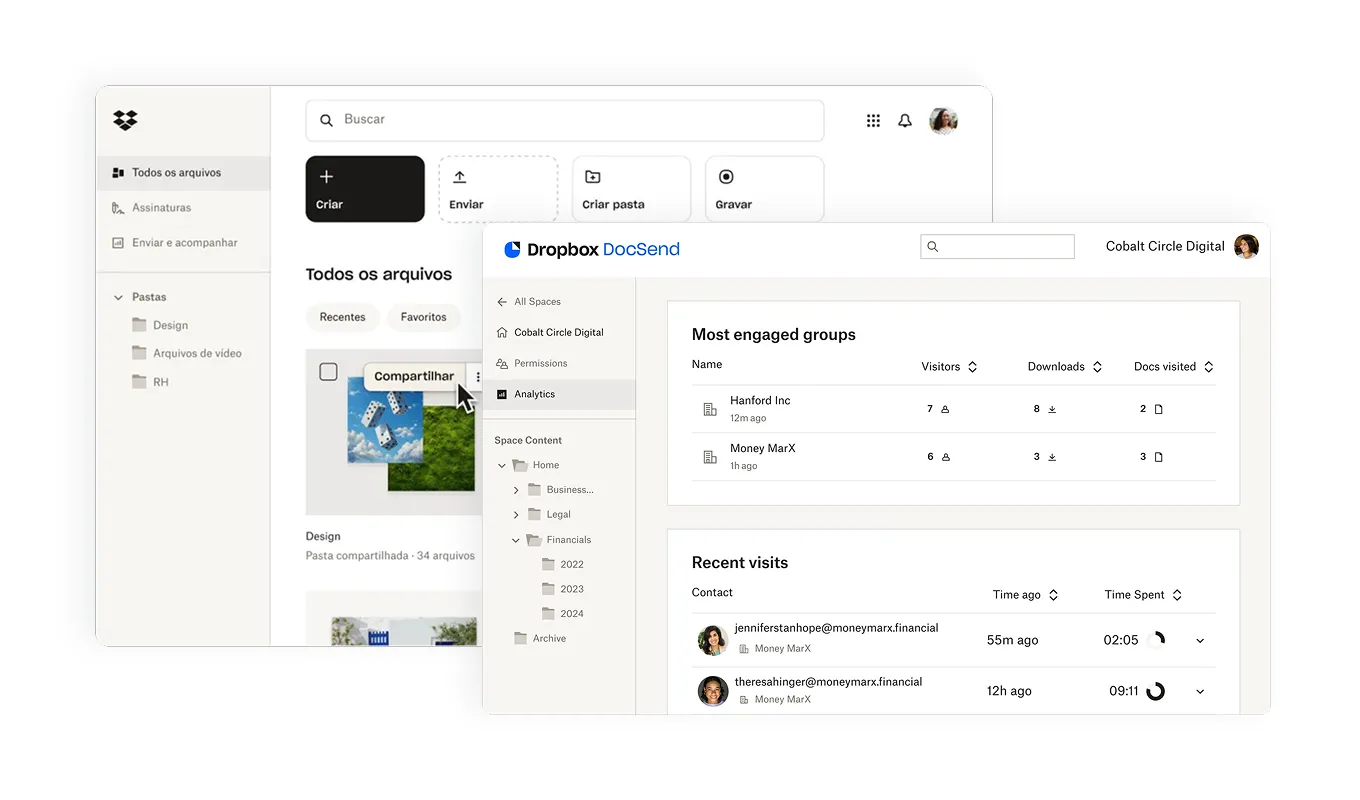
Dropbox is an American cloud storage platform launched in 2007. Its main focus is automatic file sync across devices and secure sharing. It became known for its simple interface and ease of use for storing and accessing files from anywhere.
Dropbox does not have native corporate email, internal chat, video conferencing, or project management. For a complete work experience, you need to add complementary tools.
## What is Optiwork
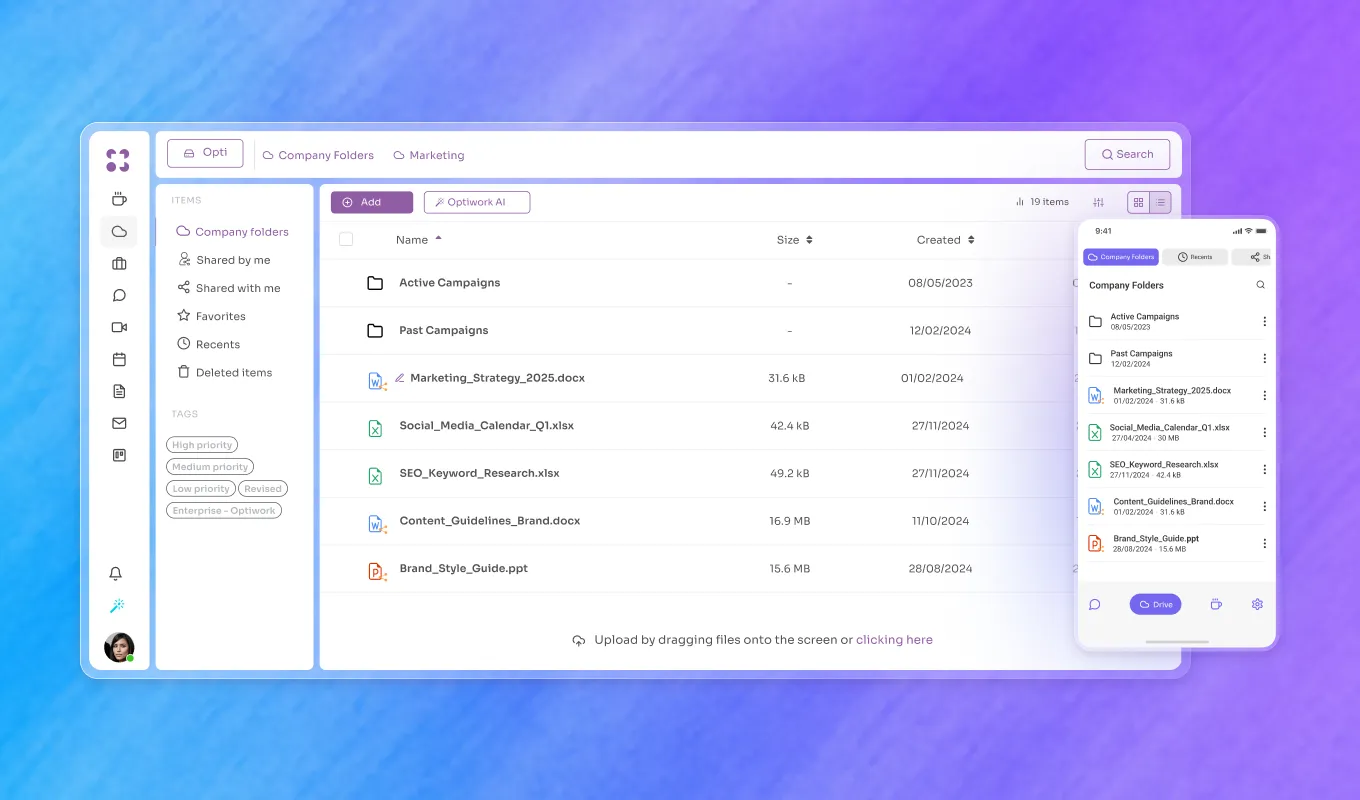
Optiwork is Optidata's corporate workspace platform. Instead of an isolated drive, it brings into a single environment the tools a company uses on a daily basis: email, drive, chat, video conferencing, projects, knowledge base, document approval, and integrated AI.

Optiwork's drive belongs to the company, not to each user. Every access to any file is logged: who opened, edited, downloaded, deleted, or shared, with date, time, and device, including external users. Administrators configure download controls per folder, user, or group and export audit reports as CSV for data protection compliance.
## Direct comparison
| Feature | Optiwork | Dropbox |
|---|---|---|
| Cloud storage | Yes | Yes |
| Cross-device sync | Yes | Yes |
| File versioning | Yes | Yes |
| Native access auditing | Yes | Limited |
| Download control by user | Yes | No |
| Document approval | Yes | No |
| Native collaborative editing | Yes | No (depends on integration) |
| Corporate email | Yes | No |
| Internal chat | Yes | No |
| Video conferencing | Yes | No |
| Project management | Yes | No |
| Corporate social network | Yes | No |
| Native data protection compliance | Yes | Not declared |
| Portuguese support | Yes | No |
| Billing in Brazilian reais | Yes | No |
| Storage included | 2TB per user | Varies by plan |
## Pricing: reais vs dollars
Dropbox charges in U.S. dollars. As of May 2025, the Standard plan for teams cost US$15 per user per month, equivalent to roughly R$85 at the time. With FX variation, that figure can rise or fall throughout the contract.
Optiwork charges R$49 per user per month, in Brazilian reais, with monthly billing and no mandatory annual contract. The plan includes all available modules, with no extra cost per feature.
It's worth considering that Dropbox is a storage product. A company using Dropbox is likely also paying for corporate email, chat, and video conferencing separately. Adding those costs together, the total per-user cost tends to be significantly higher than what appears in the Dropbox plan.
## What sets Optiwork apart in file control
Dropbox offers version history and basic sharing controls. For detailed traceability, advanced log functionality is available in higher-tier plans.
In Optiwork, audit logging is native across all plans: who accessed, when, what they did, and from which device. This also covers users outside the company, such as partners and suppliers granted access to documents. The audit dashboard is accessible to any administrator, with no need for advanced technical knowledge.
Optidata, the company behind Optiwork, holds the international SOC 2 Type II certification with 88 controls audited by an independent third party, covering security, availability, and confidentiality of data.
## When Dropbox makes more sense
Dropbox is a good choice if the company's focus is exclusively on file storage and sync, with a simple interface and integrations with tools already used daily such as Microsoft 365 or Google Workspace.
## When Optiwork makes more sense
Optiwork solves more when the company wants to consolidate storage, communication, and projects in a single platform. It makes sense especially for those who:
- Want file traceability and data protection compliance without advanced technical setup
- Need corporate email, chat, and video conferencing integrated with the drive
- Pay for multiple separate tools and want to reduce the total stack cost
- Prefer billing in Brazilian reais with predictable pricing
- Want Portuguese-language support with direct service
Grupo Tozzo, one of the largest operations in Brazil's food industry, migrated to Optiwork and consolidated five tools into one platform. In the words of Commercial Director Felipe Tozzo: "anyone who has this pain and needs a product with great value would have my strong recommendation for Optiwork."
---
[Start the free trial](https://work.optidata.com/en/free-trial) and see how Optiwork works for your type of company.
Prefer to see it before signing up? [Schedule a demo](https://calendar.work.optidata.cloud/calendar/appointment/links/a11e94c4-6e20-493c-bf9f-owt1-d4145c7dd285/view?language=en-US) with our team.
---
## Frequently asked questions
**Q: Does Optiwork fully replace Dropbox?**
A: For most companies, yes. Optiwork has cloud storage, versioning, permission control, and cross-device sync via Optiwork Sync, plus all other modules included in the plan. If you have specific integrations built on top of the Dropbox API, there are points to evaluate before migrating.
**Q: Does Optiwork have Sync like Dropbox?**
A: Yes. Optiwork Sync is a desktop app that syncs Drive files and lets you open files directly in the local software you already use, without having to download the file manually.
**Q: How does migration from Dropbox to Optiwork work?**
A: Optiwork has a team specialized in migrations that runs the entire process: data export, folder structure setup, and permission configuration. The customer validates the plan before execution and the Optiwork team handles the migration alongside the company.
**Q: Is Optiwork compliant with data protection law?**
A: Yes. Optiwork offers a native audit log of every access, configurable retention policy, traceable deletion, and CSV-exportable reports for compliance reporting. Optidata holds the SOC 2 Type II certification with 88 controls audited externally.
**Q: Is Optiwork support available in English?**
A: Yes. Support is provided in English, Portuguese, and Spanish, via chat and email, with an SLA of up to 5 minutes during business hours, by Optiwork's internal team.
---
# Optiwork vs Box: which is the best option for your company in 2026?
*Published: 2025-05-09T00:00:00.000Z · Author: Redação Optidata · Category: Comparativo*
Source: https://work.optidata.com/blog/optiwork-vs-box
> Direct comparison between Optiwork and Box: features, pricing, support, and file governance. Find out which platform best solves your business needs.
**TL;DR**
- Box specializes in content management and file collaboration. Optiwork is a complete platform that includes drive, email, chat, video conferencing, projects, and more in a single environment.
- Box charges in U.S. dollars. Optiwork charges R$49/user/month in Brazilian reais, with 2TB of storage included.
- Optiwork has native file auditing, document approval, and a Security Center with global 2FA. Box has advanced security controls, but focused on content management.
- If your company needs a tool specialized in file storage and collaboration, Box covers it well. If you need to centralize communication, projects, and files in a single platform with native governance, Optiwork solves more.
---
Box and Optiwork meet similar needs in some areas, but start from different premises. Understanding that difference is what determines which makes more sense for your business.
## What is Box
Box is an American cloud content management platform. Its main focus is storage, collaborative editing, and secure file sharing. It also offers:
- Form creation
- Task assignment linked to files
- Content engagement metrics
- Electronic signatures
- Workflow automation via AI agents
- Over 1,500 integrations with other apps
Box does not offer corporate email, internal chat, video conferencing, or a corporate social network. For those needs, you need to add complementary tools.
## What is Optiwork

Optiwork is Optidata's corporate workspace platform. The proposal is to bring into a single environment the tools a company uses on a daily basis: email, drive, chat, video conferencing, projects, knowledge base, document approval, and integrated AI.

Optiwork's drive belongs to the company, not to each user. Every access to any file is logged: who opened, edited, downloaded, deleted, or shared, with date, time, and device. Administrators can configure download controls per folder, user, or group and export audit reports as CSV for data protection compliance.
Optidata, the company behind Optiwork, holds the international SOC 2 Type II certification, with 88 security controls audited by an independent third party.
## Direct comparison
| Feature | Optiwork | Box |
|---|---|---|
| Drive for editing and collaboration | Yes | Yes |
| Native file auditing | Yes | Yes |
| Document approval | Yes | Yes |
| AI assistant | Yes | Yes |
| Task management | Yes | Yes |
| Corporate email | Yes | No |
| Internal chat | Yes | No |
| Video conferencing | Yes | No |
| Corporate social network | Yes | No |
| Security Center (global 2FA) | Yes | No |
| Portuguese support | Yes | No |
| Billing in Brazilian reais | Yes | No |
| Storage included | 2TB per user | Varies by plan |
## Pricing: reais vs dollars
Box charges in U.S. dollars. As of April 2025, the Business plan cost US$17.30 per user per month, equivalent to roughly R$99 at the time. With FX variation, that figure can rise or fall throughout the contract.
Optiwork charges R$49 per user per month, in Brazilian reais, with monthly billing and no mandatory annual contract. The plan includes all available modules, with no extra cost per feature.
For Brazilian companies, the predictability of cost in local currency is a relevant factor in medium- and long-term financial planning.
## When Box makes more sense
Box is a good choice if the company's focus is exclusively on corporate content management, with advanced version controls, file auditing, and integration with tools already in the company's ecosystem, especially if there are existing contracts with Microsoft 365, Salesforce, or Slack.
## When Optiwork makes more sense
Optiwork solves more when the company wants to consolidate communication, files, and projects in a single platform, reducing dependence on multiple separate tools. It makes sense especially for those who:
- Need corporate email, chat, and video conferencing integrated with the drive
- Want file traceability and data protection compliance without advanced technical setup
- Prefer billing in Brazilian reais with predictable pricing
- Want Portuguese-language support with direct service
Grupo Tozzo, one of the largest operations in Brazil's food industry, migrated to Optiwork and consolidated five tools into one platform. In the words of Commercial Director Felipe Tozzo: "today with Optiwork we can block all access in a few minutes, if not seconds."
---
[Start the free trial](https://work.optidata.com/en/free-trial) and see how Optiwork works for your type of company.
Prefer to see it before signing up? [Schedule a demo](https://calendar.work.optidata.cloud/calendar/appointment/links/a11e94c4-6e20-493c-bf9f-owt1-d4145c7dd285/view?language=en-US) with our team.
---
## Frequently asked questions
**Q: Does Optiwork fully replace Box?**
A: For most companies, yes. If your company uses Box as a central storage tool and needs email, chat, and video conferencing, Optiwork covers everything in a single plan. If you have specific integrations built on top of Box's API with other systems, there are points to evaluate before migrating.
**Q: Does Optiwork have the same security features as Box?**
A: Optiwork has native auditing of every file access, download controls by folder and user, document approval with automatic locking, and a Security Center with global 2FA. Optidata, the company behind Optiwork, holds the SOC 2 Type II certification with 88 controls audited externally.
**Q: How does migration from Box to Optiwork work?**
A: Optiwork has a team specialized in migrations that runs the entire process: data export, folder structure setup, and permission configuration. The customer validates the plan before execution, and the Optiwork team handles the migration alongside the company.
**Q: Is Optiwork support available in English?**
A: Yes. Support is provided in English, Portuguese, and Spanish, via chat and email, with an SLA of up to 5 minutes during business hours, by Optiwork's internal team.
**Q: What is the storage difference between the two?**
A: Optiwork includes 2TB of storage per user in the Pro plan at R$49/month. Box varies storage by plan tier, with different limits at each level.
---
# Contal Case Study: security, data protection, and collaboration in accounting management with Optiwork
*Published: 2025-05-07T00:00:00.000Z · Author: Redação Optidata · Category: Case*
Source: https://work.optidata.com/blog/case-contal
> With over 20 years in the market, Contal needed file traceability, data protection compliance, and centralization of operations. See how Optiwork solved it.
**TL;DR**
- Contal is an accounting management firm with over 20 years in the market that needed file traceability and data protection compliance
- The core challenge was controlling who accesses, edits, and shares client documents, with auditable records
- With Optiwork, Contal gained granular permission control, automatic versioning, and complete audit logging of every file action
- Centralizing tools into a single platform eliminated the need to switch between systems throughout the day
---
With over 20 years of experience, Contal is a reference in the accounting management market. Founded by Carlos Ludwig and his partners, the company has always prioritized data protection and efficiency in its internal processes.
When Brazil's General Data Protection Law (LGPD) came into force, Contal intensified the search for a solution that would guarantee security, traceability, and real control over its clients' data.
## The challenge: data protection, remote access, and centralization
Accounting firms deal daily with highly sensitive client information. Tax, financial, payroll, and filing data require strict control over who accesses what, when, and what is done with that information.
Beyond data protection compliance, Contal needed a system that allowed secure remote access to files, without depending on physical infrastructure or VPN. Carlos Ludwig, Director and Partner at Contal, explains the context:
> "Since the start of the LGPD, we've been very concerned with data security. We needed an online system that would let us access files from anywhere, including from inside our clients' offices."
The challenge wasn't only security. Contal also wanted to centralize email, communication, projects, and documentation into a single platform, eliminating constant switching between different tools throughout the team's day.
## The solution
After evaluating the market, Contal chose Optiwork. The decision was based on the combination of security, traceability, and breadth of features in a single platform.
> "We didn't find in the market what we ended up finding in Optiwork. It's a complete tool, ranging from email and calendar management to the ability to make recorded video calls, plus the internal social network and the projects and papers modules."
> — *Carlos Ludwig, Director and Partner at Contal*

The Contal team went through full training on the platform's features, conducted by the Optiwork team. Data migration and adoption of the new tool happened without operational interruption.
## What changed in practice
### Access control and full traceability
The first gain felt was granular control over who accesses what. Contal began creating users with different permission levels: administrators with general access and users with restricted access to the files defined for each profile.
Every action on any file is logged. Who accessed it, when, and what they did. This record is what the LGPD requires, and Contal can now demonstrate it with concrete evidence:
> "The system has substantial robustness, because it creates admin users with access to general data and user-level accounts with restricted access to the files we define. We have full traceability of what each user accesses, when they access it, and what they do with the files."
> — *Carlos Ludwig*
### Automatic document versioning
Contal works with documents that go through multiple revisions over time. With Optiwork's automatic versioning, any previous version of a file can be recovered without depending on manual copies or backup processes.
> "One of the main advantages we noticed was versioning. We work with the platform collaboratively, and if I need to go back to a previous version, I have that option."
> — *Carlos Ludwig*
### Secure sharing with clients
Documents shared with clients are now protected by login and password, ensuring that only the right people access each file. This solves a common gap in accounting firms: the difficulty of controlling access to documents sent externally.
### Centralized workflow
With email, chat, video conferencing, projects, and documentation in a single platform, the Contal team stopped switching between systems throughout the day. The productivity gain was direct:
> "Centralizing activities in a single tool produces a major productivity gain. We make it so people aren't constantly switching screens."
> — *Carlos Ludwig*
## Result
Optiwork became Contal's main work platform. The company operates with auditable data security, documented LGPD compliance, real-time collaboration, and a single environment for all day-to-day tools.
> "We're very satisfied with the system. We see it as a highly innovative tool. We didn't find in the market what we ended up finding in Optiwork."
> — *Carlos Ludwig*
---
[Start the free trial](https://work.optidata.com/en/free-trial) and see how Optiwork works for your type of company.
Prefer to see it before signing up? [Schedule a demo](https://calendar.work.optidata.cloud/calendar/appointment/links/a11e94c4-6e20-493c-bf9f-owt1-d4145c7dd285/view?language=en-US) with our team.
---
## Frequently asked questions
**Q: Is Optiwork suitable for accounting firms?**
A: Yes. Optiwork offers granular permissions by user and folder, full traceability of access and actions on files, automatic versioning, and CSV export of audit reports for data protection compliance. These features are especially relevant for firms that handle clients' tax and financial data.
**Q: How does Optiwork help with data protection compliance?**
A: Optiwork logs every file action with date, time, user, and device. You can export audit reports as CSV, set data retention policies, control who can download each document, and revoke access immediately when needed. These controls directly meet what articles 37 and 46 of the LGPD require for logging and protecting personal data.
**Q: Can external clients be given access without seeing other documents?**
A: Yes. Optiwork lets you create share links protected by login and password, with permissions specific to each folder or file. The external client only accesses what was released to them, and the access is recorded in the audit log.
**Q: How does migration to Optiwork work?**
A: Optiwork has a team specialized in migrations that runs the entire process together with the company: data export, folder structure setup, file migration, and permission configuration. The customer validates the plan before execution. Contal went through this process with no operational interruption.
**Q: Is Optiwork support available in English?**
A: Yes. Support is provided in English, Portuguese, and Spanish, via chat and email, with an SLA of up to 5 minutes during business hours, by Optiwork's internal team.
---
# Optiwork vs Slack: which is the best platform for your business in 2026?
*Published: 2025-05-05T00:00:00.000Z · Author: Redação Optidata · Category: Comparativo*
Source: https://work.optidata.com/blog/optiwork-vs-slack
> Direct comparison between Optiwork and Slack: features, pricing, and total stack cost. Find out which platform best solves your business needs.
**TL;DR**
- Slack specializes in corporate communication: messages, channels, and integrations. Optiwork is a complete platform that includes chat, email, drive, video conferencing, projects, and more in a single environment.
- Slack Pro costs US$8.75/user/month (approximately R$50 in May 2025). But Slack users almost always pay for storage, email, and video conferencing separately. Optiwork covers all of that for R$49/user/month.
- For internal communication, Slack is a solid solution. For those who want to consolidate tools in a single platform with file governance and corporate email included, Optiwork solves more.
---
Slack and Optiwork meet a shared need: corporate communication. But the propositions differ, and understanding that difference is what determines which makes more sense for your business.
## What is Slack
Slack is an American corporate communication platform launched in 2013. It became known for organizing conversations by channels, instant messaging, and a wide range of integrations with external tools such as Google Drive, Trello, and Zoom.
Its main features are:
- Instant messaging and channels organized by topic or team
- Audio and video calls
- File sharing
- Over 2,000 integrations with external tools
Slack does not have native corporate email, a drive with file governance, project management, or a corporate social network. For a complete work experience, you need to add and integrate complementary tools.
## What is Optiwork

Optiwork is Optidata's corporate workspace platform. Instead of specializing in communication, it brings into a single environment every tool a company uses on a daily basis:
- Internal chat with groups, channels, and highlights
- Corporate email
- Drive with file traceability and access control
- Video conferencing with recording
- Project management
- Collaborative editing of documents, spreadsheets, and presentations
- Internal knowledge base
- Corporate social network
- Integrated AI
All in a single system, with the same admin panel and the same permissions.
## Direct comparison
| Feature | Optiwork | Slack |
|---|---|---|
| Internal chat with channels | Yes | Yes |
| Video calls | Yes | Yes |
| Integrations with external tools | Yes | Yes (2,000+) |
| Corporate email | Yes | No |
| Drive with traceability | Yes | No |
| Download control by user | Yes | No |
| Document approval | Yes | No |
| Project management | Yes | No |
| Internal knowledge base | Yes | No |
| Corporate social network | Yes | No |
| Integrated AI | Yes | Yes (paid plans) |
| Portuguese support | Yes | No |
| Billing in Brazilian reais | Yes | No |
## Pricing: what looks simple may not be
Slack Pro costs US$8.75 per user per month (approximately R$50 in May 2025, with FX variation). The Business+ plan reaches US$15 per user.
Optiwork charges R$49 per user per month, in Brazilian reais, with monthly billing and no mandatory annual contract. All modules are included.
The relevant point for Slack users: the platform covers communication. File storage, corporate email, and video conferencing fall outside. A company using Slack typically pays for those tools separately, which raises the total per-user cost considerably above the Slack plan price.
## Communication and context in the same place
The main advantage of Slack is the maturity of channel-based communication. For teams that need many integrations with established external tools, the Slack ecosystem is solid.
Optiwork's Talk covers the same Slack use cases on a daily basis: text channels, groups, direct messages, and highlights. The difference is that a conversation in Talk can connect directly to a file in Drive, a task in Projects, or a document in Papers, without leaving the platform or installing integrations.
Beyond Talk, Optiwork has Social, a corporate feed for announcements, employee recognition, and internal engagement. This separates formal communication (Talk) from lighter content (Social), without mixing the two contexts.
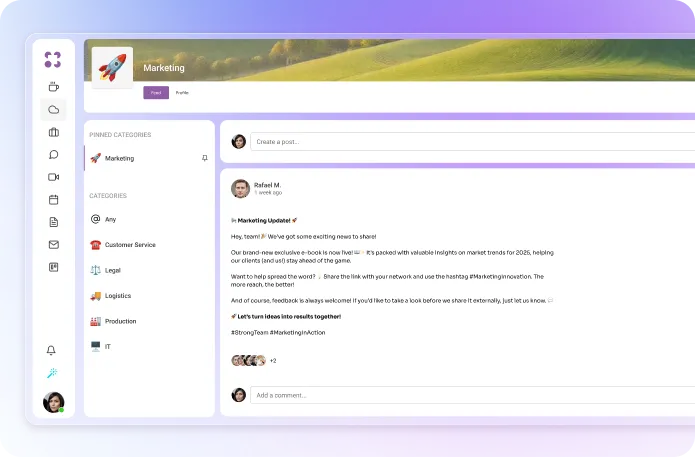
## Drive with file governance
Slack does not have a native corporate drive. Files shared in chats are stored temporarily, and access control is limited. For storage with granular permissions, versioning, and traceability, it has to be integrated with Google Drive, Dropbox, or OneDrive.
In Optiwork, the drive belongs to the company, not to each user. Every access to any file is logged: who opened, edited, downloaded, deleted, or shared, with date, time, and device. Administrators configure download controls per folder or user and export audit reports as CSV for data protection compliance.
## See Optiwork in action
## When Slack makes more sense
Slack is a good choice if your company needs exclusively a channel-based communication platform, has critical integrations already built within the Slack ecosystem, or operates in an environment where most collaborators already use the platform fluently.
## When Optiwork makes more sense
Optiwork solves more when the company wants to consolidate communication, files, and projects in a single platform. It makes sense especially for those who:
- Pay for Slack plus email, drive, and video conferencing separately and want to reduce total cost
- Need file traceability and data protection compliance
- Want corporate email integrated with the same environment as chat and projects
- Prefer billing in Brazilian reais with predictable pricing
- Want Portuguese-language support with direct service
---
[Start the free trial](https://work.optidata.com/en/free-trial) and see how Optiwork works for your type of company.
Prefer to see it before signing up? [Schedule a demo](https://calendar.work.optidata.cloud/calendar/appointment/links/a11e94c4-6e20-493c-bf9f-owt1-d4145c7dd285/view?language=en-US) with our team.
---
## Frequently asked questions
**Q: Does Optiwork's Talk fully replace Slack?**
A: For day-to-day corporate use, yes. Talk has text channels, direct messages, groups, and highlights. If your company has specific integrations built on Slack's API with external systems, there are points to evaluate before migrating.
**Q: Does Optiwork have integrated video conferencing?**
A: Yes. Optiwork's Call covers group meetings, screen sharing, recording, and a waiting room. SmartBook automatically generates meeting links when scheduling through Calendar.
**Q: How does migration from Slack to Optiwork work?**
A: Optiwork has a team specialized in migrations that runs the entire process together with the company. The customer validates the plan before execution.
**Q: Is Optiwork compliant with data protection law?**
A: Yes. Optiwork offers a native audit log of every access, configurable retention policy, and CSV-exportable reports. Optidata holds the SOC 2 Type II certification with 88 controls audited externally.
**Q: Is Optiwork support available in English?**
A: Yes. Support is provided in English, Portuguese, and Spanish, via chat and email, with an SLA of up to 5 minutes during business hours, by Optiwork's internal team.
---
# Optiwork vs ClickUp: which is the best platform for your business in 2026?
*Published: 2025-04-04T00:00:00.000Z · Author: Redação Optidata · Category: Comparativo*
Source: https://work.optidata.com/blog/optiwork-vs-clickup
> Direct comparison between Optiwork and ClickUp: features, pricing, and purpose. Find out which platform best solves your business needs.
**TL;DR**
- ClickUp specializes in project and task management, with high flexibility and customization. Optiwork is a complete platform that includes projects, email, drive, chat, video conferencing, and more in a single environment.
- ClickUp Business costs US$12/user/month (approximately R$72 in January 2025). Optiwork costs R$49/user/month with all modules included.
- ClickUp users almost always pay for email, storage, and video conferencing separately. Optiwork covers all of that in the same plan.
- For project management with high customization and complex integrations, ClickUp has the edge. For those who want projects integrated with email, drive, and communication in a single platform, Optiwork solves more.
---
ClickUp and Optiwork overlap on project management and collaboration, but start from different premises. ClickUp was built to be the best work management platform. Optiwork was built to be the only environment a company needs to operate.
## What is ClickUp
ClickUp is an American work management platform built to help teams organize, track, and manage projects, tasks, and processes. It is known for its flexibility and wide variety of available views and customizations.
Its main features are:
- Task and project management with multiple views
- Document collaboration
- Workflow automations
- Dashboards and reports
- Over 1,000 integrations with external tools
ClickUp does not have native corporate email, a corporate drive with file governance, or integrated video conferencing. For a complete work experience, you need to add complementary tools.
## What is Optiwork

Optiwork is Optidata's corporate workspace platform. It brings into a single environment the tools a company uses on a daily basis: email, drive, chat, video conferencing, projects, knowledge base, document approval, and integrated AI.
On the project management side, Optiwork has kanban, recurring tasks, task dependencies, templates, custom fields, checklists with assignees, and a personal task center where each user sees everything they need to deliver in the day.
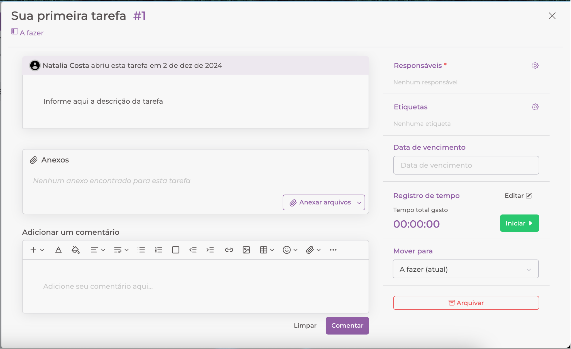
The structural differentiator is native integration: a task created in Projects can be linked to a file in Drive, a conversation in Talk, or an email in Mail, without installing external integrations.
## Direct comparison
| Feature | Optiwork | ClickUp |
|---|---|---|
| Task and project management | Yes | Yes |
| Multiple views (kanban, list) | Yes | Yes |
| Workflow automations | Yes | Yes |
| Document collaboration | Yes | Yes |
| Corporate email | Yes | No |
| Drive with file traceability | Yes | No |
| Download control by user | Yes | No |
| Document approval | Yes | No |
| Internal chat | Yes | Yes |
| Video conferencing | Yes | No (external integration) |
| Internal knowledge base | Yes | Yes |
| Corporate social network | Yes | No |
| Integrated AI | Yes | Yes |
| Portuguese support | Yes | No |
| Billing in Brazilian reais | Yes | No |
## Pricing: what is and isn't included
ClickUp Business costs US$12 per user per month (approximately R$72 in January 2025, with FX variation). The plan does not include corporate email, a governance drive, or video conferencing. A company using ClickUp and needing those tools pays for them separately.
Optiwork charges R$49 per user per month, in Brazilian reais, with monthly billing and no mandatory annual contract. All modules are included: email, drive, chat, video conferencing, projects, knowledge base, and more.
See all details at [work.optidata.com/en/pricing](https://work.optidata.com/en/pricing).
## Purpose: project management vs full workspace
The central difference between the two platforms is scope.
ClickUp is one of the most complete and customizable work management tools in the market. For teams that need high flexibility in how to organize tasks, with highly customized views and many integrations with specific tools, ClickUp has the edge.
Optiwork starts from a different premise: instead of being the best at one module, it aims to be the only environment a company needs to work. Productivity gains come from native integration between tools, not from individual customization of each one.
## When ClickUp makes more sense
ClickUp is a good choice if your company needs a dedicated, highly customizable project management tool, with specific integrations already built with other systems, and already has separate solutions for email, communication, and storage that work well.
## When Optiwork makes more sense
Optiwork solves more when the company wants to consolidate tools in a single platform. It makes sense especially for those who:
- Pay for ClickUp plus email, drive, and video conferencing separately
- Need file traceability and data protection compliance
- Want projects integrated with email, chat, and drive in the same environment
- Prefer billing in Brazilian reais with predictable pricing
- Want Portuguese-language support with direct service
## See Optiwork in action
---
[Start the free trial](https://work.optidata.com/en/free-trial) and see how Optiwork works for your type of company.
Prefer to see it before signing up? [Schedule a demo](https://calendar.work.optidata.cloud/calendar/appointment/links/a11e94c4-6e20-493c-bf9f-owt1-d4145c7dd285/view?language=en-US) with our team.
---
## Frequently asked questions
**Q: Does Optiwork have the same project management features as ClickUp?**
A: For day-to-day corporate use, yes. Optiwork's Projects has kanban, recurring tasks, dependencies, templates, custom fields, checklists with assignees, and a personal task center. If your company needs very specific views or complex automations that depend on integrations with external systems, there are points to evaluate before migrating.
**Q: Does Optiwork have integrated video conferencing?**
A: Yes. Optiwork's Call covers group meetings, screen sharing, recording, and a waiting room. SmartBook automatically generates meeting links when scheduling through Calendar.
**Q: How does migration from ClickUp to Optiwork work?**
A: Optiwork has a team specialized in migrations that runs the entire process together with the company. The customer validates the plan before execution.
**Q: Is Optiwork compliant with data protection law?**
A: Yes. Optiwork offers a native audit log of every file access, configurable retention policy, and CSV-exportable reports. Optidata holds the SOC 2 Type II certification with 88 controls audited externally.
**Q: Is Optiwork support available in English?**
A: Yes. Support is provided in English, Portuguese, and Spanish, via chat and email, with an SLA of up to 5 minutes during business hours, by Optiwork's internal team.
---
# Optiwork vs Monday: which is the best project management platform in 2026?
*Published: 2025-03-30T00:00:00.000Z · Author: Redação Optidata · Category: Comparativo*
Source: https://work.optidata.com/blog/optiwork-vs-monday
> Direct comparison between Optiwork and Monday.com: features, pricing, and purpose. Find out which platform best solves your business needs.
**TL;DR**
- Monday.com specializes in project and task management, with a visual and flexible interface. Optiwork is a complete platform that includes projects, email, drive, chat, video conferencing, and more in a single environment.
- Monday.com Pro cost R$89/user/month in December 2024. Optiwork costs R$49/user/month with all modules included.
- Monday does not have native corporate email, a drive with file governance, or video conferencing. Monday users almost always pay for those tools separately.
- For project management with a flexible visual layer and advanced dashboards, Monday has the edge. For those who want projects integrated with email, drive, and communication in a single platform with a lower total cost, Optiwork solves more.
---
Monday.com and Optiwork intersect on project management, but start from different premises. Monday was built to be the best work management tool. Optiwork was built to be the only environment a company needs to operate.
## What is Monday.com
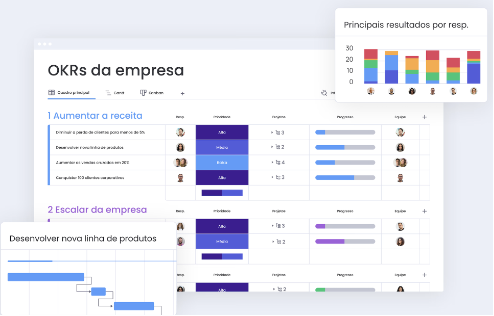
Monday.com is an American project management platform known for its intuitive visuals and flexibility in organizing tasks. It is widely used by marketing, HR, IT, and product teams to track project progress, campaigns, and reports.
Monday does not have native corporate email, a drive with file governance, integrated video conferencing, or a corporate social network. For a complete work experience, you need to add complementary tools.
## What is Optiwork
Optiwork is Optidata's corporate workspace platform. Instead of specializing in projects, it brings into a single environment every tool a company uses on a daily basis.
In project management, Optiwork has an interactive board with multiple views, task creation with attachments, comments, assignees, deadlines, and labels, plus recurrence, task dependencies, and a personal task center.
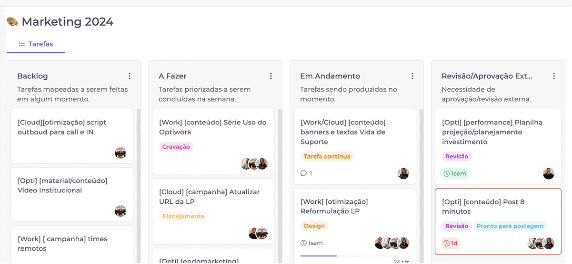
Beyond projects, Optiwork has:
- Drive with permission control, file traceability, and complete auditing
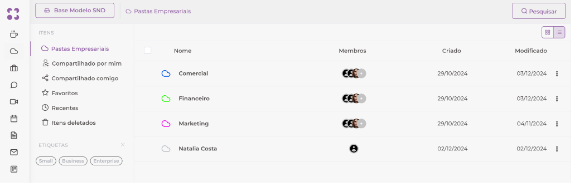
- Chat and video conferencing for integrated communication
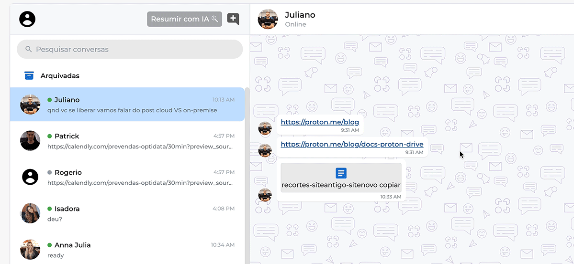
- Collaborative document editor for text, spreadsheets, and presentations
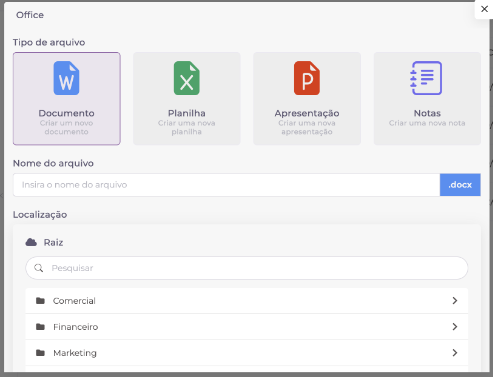
- Corporate email centralized in the same platform
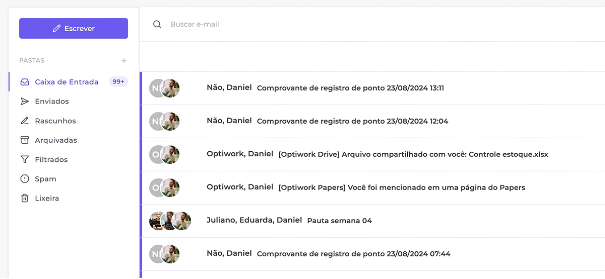
## Direct comparison
| Feature | Optiwork | Monday.com |
|---|---|---|
| Task and project management | Yes | Yes |
| Multiple views | Yes | Yes |
| Dashboards and reports | Yes | Yes |
| Internal chat | Yes | No |
| Corporate email | Yes | No |
| Drive with traceability | Yes | No |
| Download control by user | Yes | No |
| Document approval | Yes | No |
| Video conferencing | Yes | No |
| Internal knowledge base | Yes | No |
| Corporate social network | Yes | No |
| Native data protection compliance | Yes | Not declared |
| Portuguese support | Yes | No |
| Billing in Brazilian reais | Yes | No |
## Pricing: what is and isn't included
Monday.com Pro cost R$89 per user per month in December 2024. That plan covers project management but does not include corporate email, a governance drive, or video conferencing.
Optiwork charges R$49 per user per month, in Brazilian reais, with monthly billing and no mandatory annual contract. All modules are included.
A company using Monday and needing email, drive, and video conferencing separately pays for those tools outside the Monday plan. Adding those costs together, the total per-user cost tends to be significantly higher than the Monday plan price.
See all details at [work.optidata.com/en/pricing](https://work.optidata.com/en/pricing).
## Purpose: project management vs full workspace
Monday.com is one of the best visual project management tools in the market. For teams that need advanced dashboards, reports, and a highly customizable interface to track work, Monday delivers well.
Optiwork starts from a different premise: instead of being the best at projects, it aims to be the only environment a company needs. Productivity gains come from native integration between tools, not the individual depth of each module. A project can be linked to a file in Drive, a conversation in Talk, and an email in Mail, all in the same system.
Grupo Tozzo, one of the largest operations in Brazil's food industry, consolidated five tools into one platform when migrating to Optiwork. In the words of Commercial Director Felipe Tozzo: "centralizing activities in a single tool produces a major productivity gain."
## When Monday makes more sense
Monday.com is a good choice if your company needs a dedicated project management tool with advanced dashboards, complex automations, and specific integrations with other systems, and already has separate solutions for email, communication, and storage that work well.
## When Optiwork makes more sense
Optiwork solves more when the company wants to consolidate tools in a single platform. It makes sense especially for those who:
- Pay for Monday plus email, drive, and video conferencing separately
- Need file traceability and data protection compliance
- Want projects integrated with email, chat, and drive in the same environment
- Prefer billing in Brazilian reais with predictable pricing
- Want Portuguese-language support with direct service
---
[Start the free trial](https://work.optidata.com/en/free-trial) and see how Optiwork works for your type of company.
Prefer to see it before signing up? [Schedule a demo](https://calendar.work.optidata.cloud/calendar/appointment/links/a11e94c4-6e20-493c-bf9f-owt1-d4145c7dd285/view?language=en-US) with our team.
---
## Frequently asked questions
**Q: Does Optiwork have the same project management features as Monday?**
A: For day-to-day corporate use, yes. Optiwork's Projects has kanban, lists, recurring tasks, dependencies, templates, custom fields, and a personal task center. For very advanced dashboards or complex automations that depend on integrations with external systems, Monday may have the edge.
**Q: Does Optiwork have integrated video conferencing?**
A: Yes. Optiwork's Call covers group meetings, screen sharing, recording, and a waiting room. SmartBook automatically generates meeting links when scheduling through Calendar.
**Q: How does migration from Monday to Optiwork work?**
A: Optiwork has a team specialized in migrations that runs the entire process together with the company. The customer validates the plan before execution.
**Q: Is Optiwork compliant with data protection law?**
A: Yes. Optiwork offers a native audit log of every file access, configurable retention policy, and CSV-exportable reports. Optidata holds the SOC 2 Type II certification with 88 controls audited externally.
**Q: Is Optiwork support available in English?**
A: Yes. Support is provided in English, Portuguese, and Spanish, via chat and email, with an SLA of up to 5 minutes during business hours, by Optiwork's internal team.
---