Optiwork in motion: everything that changed from May 2025 to March 2026
A roundup of the main Optiwork updates over the past 11 months: security, approvals, mail, projects, mobile, and much more.
 Patrick Dal Ponte
TL;DR
- Security Center with company-wide global 2FA and password controls
- Complete document approval flow, including external approval and expiration dates
- Mail on mobile, multiple mailboxes, and converting an email into a task
- Projects with recurring tasks, templates, task relationships, and custom fields
- SmartBook: public scheduling integrated with Calendar, configurable links and automatic meeting-link generation
- Approvals available on mobile, with tracking from anywhere
Over the past 11 months, Optiwork has gone through one of its most intense evolution cycles. New modules, new features, structural improvements, and a meaningful expansion of what you can do inside the platform.
This article gathers the main updates from May 2025 to March 2026, organized by topic for easier reading. If you already use Optiwork, treat it as a guide to what’s now available — some of it you may not have noticed yet. If you’re still evaluating the platform, it’s a sample of how fast the product is moving.
1. Security and governance
Security Center
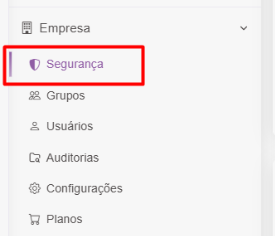
In March 2025, Optiwork launched the Security Center: a dedicated dashboard where administrators manage the company’s access policy from a single place.
From there, you can enforce mandatory 2FA for every user in the base. Anyone who hasn’t configured 2FA yet can still log in, but is redirected straight to the security page to register a device before continuing. You can also request password resets for specific users.
Expanded auditing
The Optiwork audit center grew its scope substantially over this period. Beyond file access logging, the following are now audited:
- Corporate folders: creation, renaming, deletion, and permission management
- Groups: creation, editing, deletion, and adding or removing members
- Bulk downloads: every file in a batch download generates its own record
- Drive files used as attachments in Chat, Mail, Projects, and Social
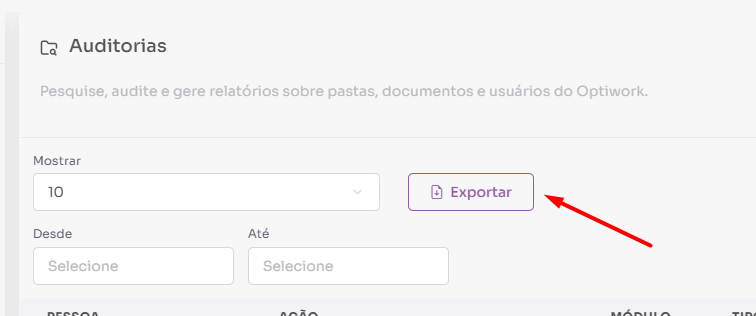
In July 2025, we added the ability to export audit reports as CSV, with filters by user, action, period, and file type. This makes it easier to account for usage in both internal audits and LGPD-compliance requirements.
Download and permission control
Starting in August 2025, users with view-only access — whether through direct sharing or work folders — can no longer download files. What’s downloadable is now part of the permission policy itself, not just a manual restriction.
External authenticator support was also added for 2FA, and in March 2026 administrators gained the ability to configure the 2FA revalidation interval: from 1 day up to 1 month, depending on the company’s security policy.
2. Document approval
The document approval flow was one of the most heavily evolved modules during this period. What started as a basic feature in March 2025 has grown into a complete validation process with full traceability.
From basic to complete
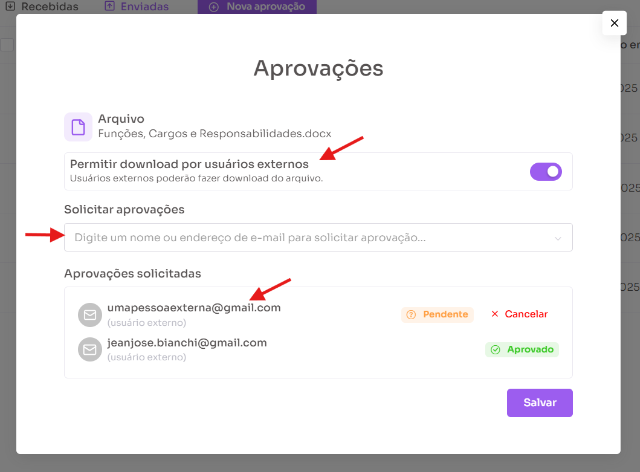
In March 2025, document approval was launched: the ability to request validation from other users, with visible status (Pending, Approved, or Rejected) and notifications in the notification center for everyone involved.
Over the following months, the flow gained:
- External approval: people outside the company receive an email, access the document, and approve or reject it with code-based verification — no Optiwork account required
- Approval note: an extra field for the requester to include a specific message for the approvers
- Expiration date: sets a validity window for the request, with automatic removal of granted access once it expires
- Notes column on the approvals page: visible for both received and sent requests
Automatic locking during approvals
In March 2026, automatic locking of documents with pending approvals was introduced. While there are open requests, the file is locked for editing, and the lock is recorded in the document’s history and audit log.
If the document is modified after being submitted for approval, approvers who haven’t responded yet receive a modification indicator and can only reject — not approve — until the requester resubmits the approval with the updated version.

Approvals on mobile
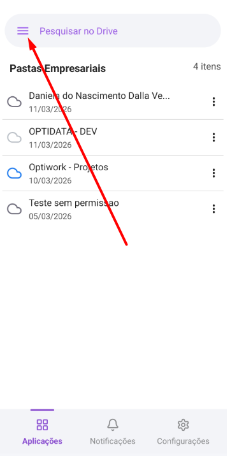
In March 2026, document approval landed on the mobile app. You can view received and sent requests, follow each approver’s status, and create new requests directly from the file’s context menu.
3. Mail
Multiple mailboxes
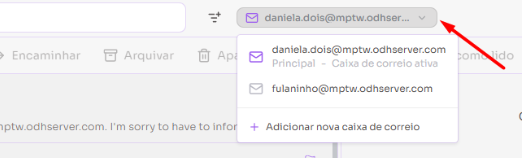
In March 2026, one of the most requested Mail updates arrived: the ability to manage multiple email addresses inside a single Optiwork account. You can switch between different inboxes without changing logins or jumping between separate workspaces.
Turn an email into a task
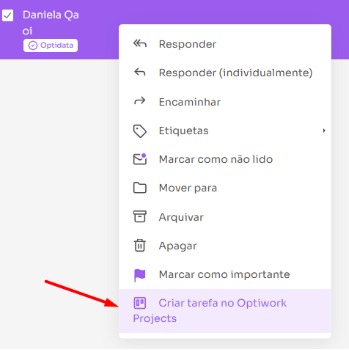
Also in March 2026, emails can be converted into Projects tasks with a single click. Right-click any email and “Create task in Optiwork Projects” appears in the menu. The email subject becomes the task title, the body becomes the description, with a direct link back to the original message.
Other Mail improvements
Throughout the period, Mail picked up a series of features that make day-to-day use more efficient:
- Read receipts: when sending an email, you can request open confirmation from the recipient (May/2025)
- Custom filters: automatic rules for organizing the inbox (March/2025)
- Contact shortcuts: groups of frequent emails with a shortcut name for auto-fill in the recipient field (November/2025)
- Email folder sharing: folders can be shared with other users in the company for joint viewing and replying (December/2025)
- Folder color customization: each folder can have a color for quick identification (November/2025)
- External link safety alert: a warning when clicking links not verified by Optiwork (February/2025)
- Save attachments straight to Drive without downloading first (February/2025)
4. Projects
The projects module went through one of the most significant evolutions of the period, focused on giving teams that juggle multiple projects more structure to lean on.
Recurring tasks
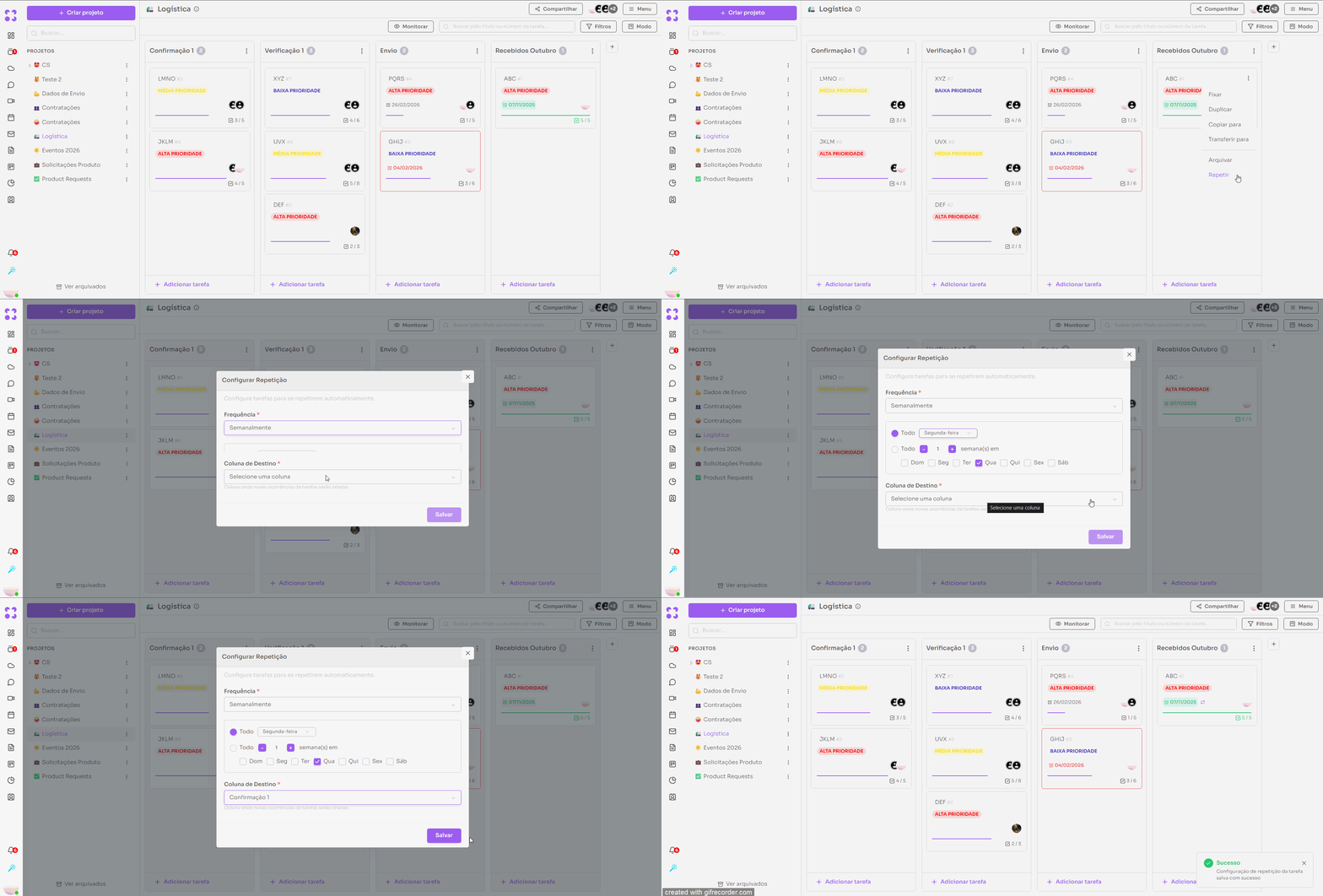
Starting in January 2026, tasks can be set to repeat automatically on defined intervals: daily, weekly, monthly, and others, following the same pattern as Calendar. New occurrences are generated without a due date and placed in the column the user defines.
Task templates
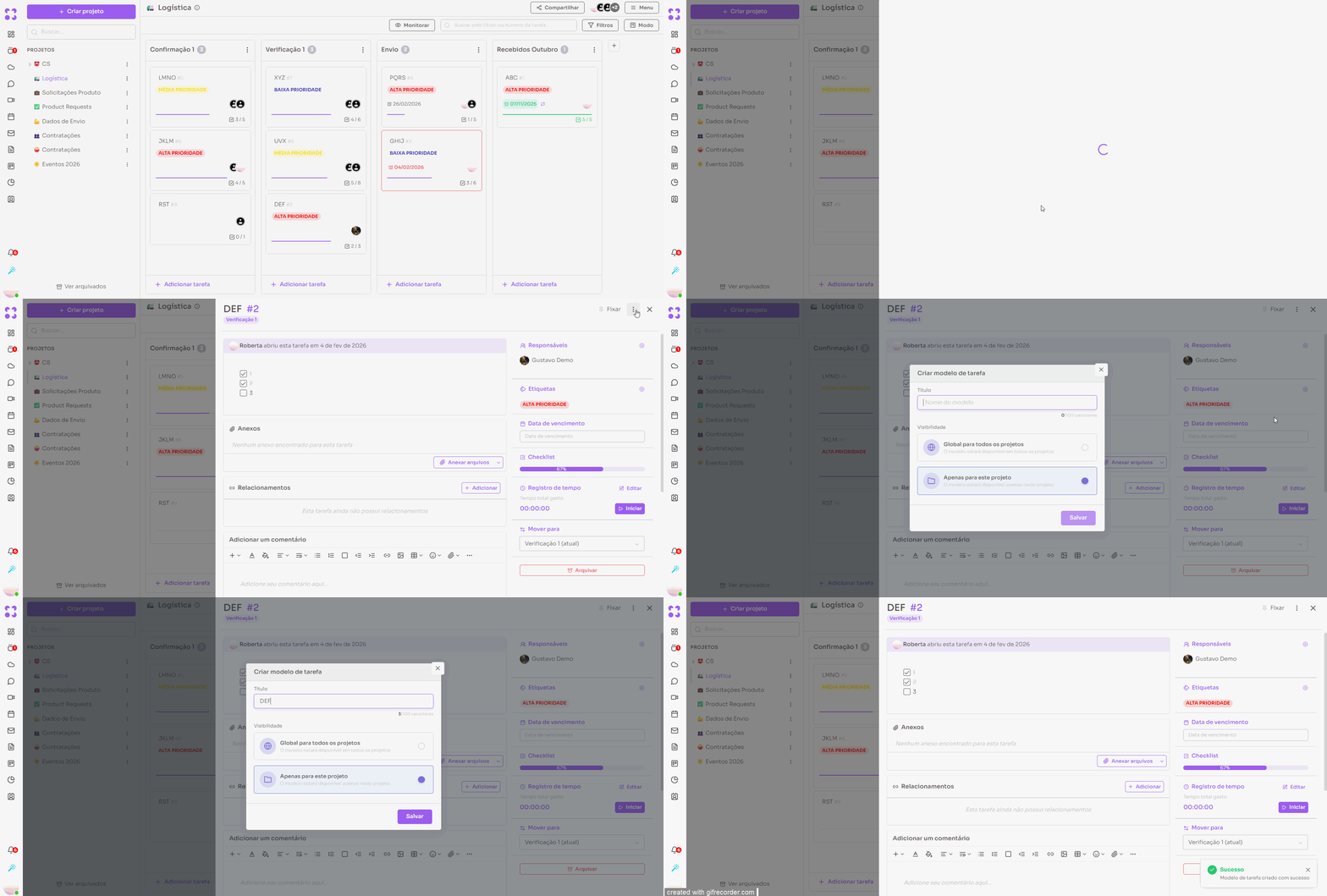
Also in January 2026, task templates arrived. You can build a standard task and save it as a template, available to every project (global) or only to the current one. When creating a new task, just pick a template and tweak whatever needs adjusting.
Task relationships
Tasks can be linked to one another with different relationship types, and a task can be marked as dependent on another. This makes following complex work easier without duplicating information.
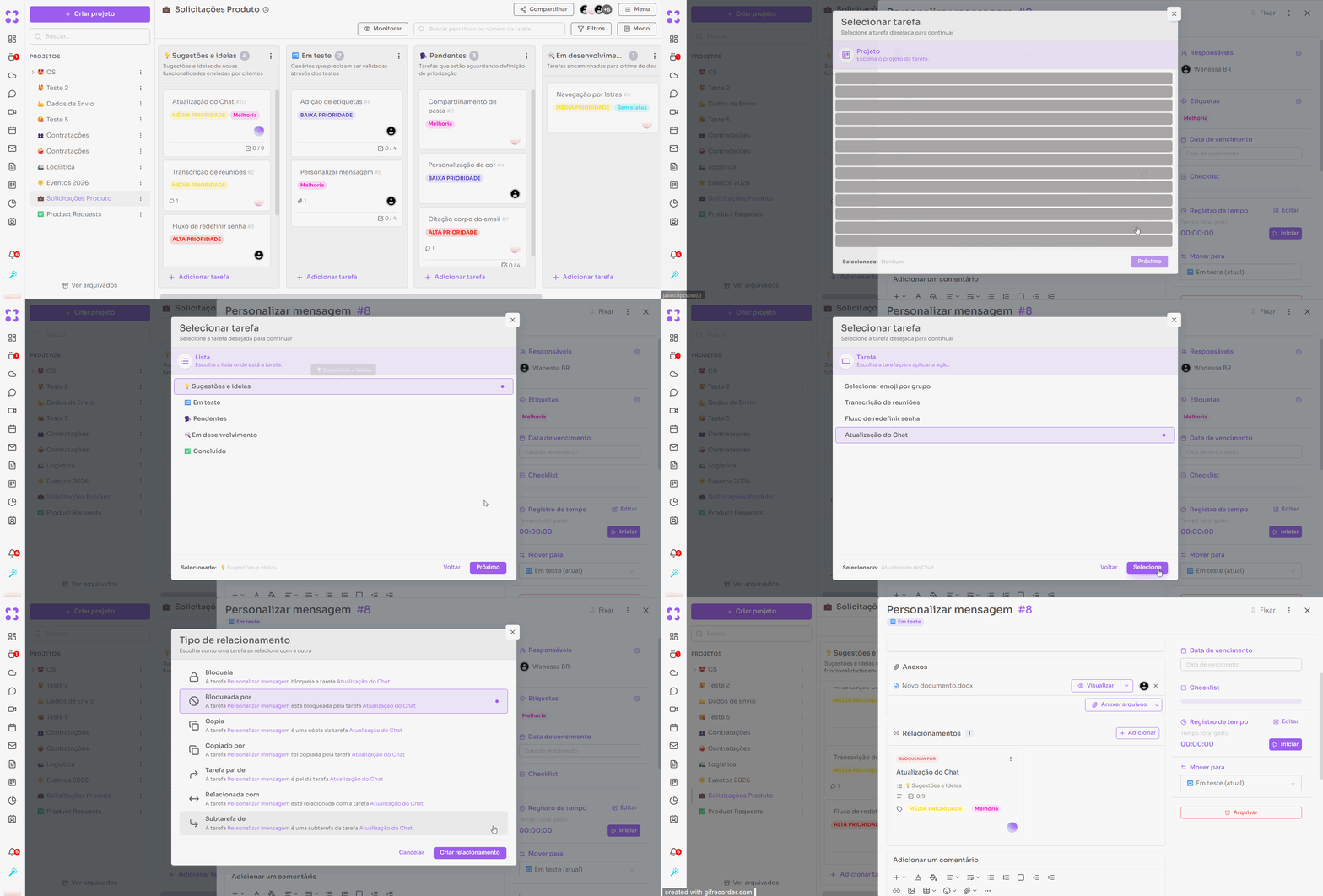
Custom fields
Custom fields arrived in Projects in February 2026 and were expanded in March. You can create text or numeric fields, mark them as required, set a default value, and choose whether the field is global (available across all projects) or specific to one project.
Other Projects improvements
- Duplicate and transfer tasks between projects, with destination-list selection (January/2026)
- Pin tasks to the top of Kanban columns (January/2026)
- Mention tasks using
#inside descriptions and comments (January/2026) - Checklists inside tasks, with automatic progress calculation (March/2026)
- “My tasks” in the side menu, listing every card assigned to the user (February/2026)
- Duplicate entire projects from the three-dot menu (December/2025)
- Public read-only project access via link (October/2025)
5. Talk (formerly Chat)
Renamed to Talk
In March 2026, the Chat module was renamed Talk, reflecting what the module has become inside Optiwork: not just messaging, but an institutional communication environment integrated with the company’s projects and processes.
User status in conversations
Talk now shows each participant’s status and custom message right inside conversations. Information updates automatically as users update their profiles, making real-time availability easier to read.
Other Talk improvements
- Highlights: pin standout messages for every member of a group, with a list in the side menu (November/2025)
- Favorite conversations: mark conversations for quick access in the side menu (November/2025)
- Conversation categories: new sidebar with All, Contacts, Group, and External Groups filters (October/2025)
- Link-based conversations: direct access to specific conversations via shared link (January/2026)
- Floating formatting toolbar: appears when selecting text for fast formatting (September/2025)
- Mark messages as read or unread (September/2025)
6. Mobile
The Optiwork mobile app expanded substantially during this period, bringing in features that used to be web-only.
- Mail on mobile: in October 2025, Mail launched in the app with view, compose, filters, archiving, and Calendar invite responses
- Approvals on mobile: in March 2026, the full document approval flow arrived in the app
- Mobile 2FA: users with two-factor enabled also need to confirm when accessing from the phone (January/2026)
- Notification center in the bottom menu, with faster access (February/2026)
- Initial-app configuration: you can choose which module opens automatically when the app starts (February/2026)
- Email folder colors on mobile, mirroring the configuration set on the web (February/2026)
- Email attachment listings without having to open the message (January/2026)
7. Papers, Calendar, Call, and Sync
Papers
- Favorites section in the side menu for quick access to bookmarked pages (March/2026)
- Quick edit: clicking edit starts editing immediately, with no manual confirmation (March/2026)
- Public access: pages can be shared by link to external users without an Optiwork account (December/2025)
- Updated text editor with
/-based formatting menu and block drag-and-drop (September/2025) - Unread-content notifications: visual indicators on categories and pages with new content (January/2026)
Calendar
- Guest availability view when creating an event (January/2026)
- Custom recurrence: fine-grained frequency and repetition pattern (November/2025)
- Reply to invites directly from the event email (March/2025)
- Per-event customizable reminders (March/2025)
- Adding groups directly to events (February/2025)
SmartBook — public scheduling integrated with Calendar (January/2026)
SmartBook lets you create one or more public scheduling links, each with its own configuration: meeting duration, available weekdays, and a per-day booking cap to prevent overbooking.
Whoever receives the link opens a public page, picks an available slot, and confirms their details. The system automatically checks availability on the Optiwork Calendar and generates the meeting link via Call — no external tooling required.
For sales teams this solves a concrete problem: instead of trading emails to align schedules, the rep sends a link and the prospect books on their own. Patrick Dal Ponte, Optiwork’s Head of Growth, uses this feature to schedule demos with prospects. See it in action.
Call
- Invite users to an in-progress call directly from the interface (March/2026)
- Waiting room to adjust camera and microphone before joining the meeting (October/2025)
- Raise-hand feature during calls (November/2025)
- Clap and Celebrate reactions with sound effects (February/2026)
- Redesigned interface with faster access to settings and recording (February/2026)
Sync
- File materialization: local shortcuts to cloud files, useful for Photoshop, CAD, and applications that depend on external references (September/2025)
- Version-conflict resolution options when the same file is edited through different channels (December/2025)
- Cancel downloads in progress (February/2026)
- Copy files to the clipboard from Sync (September/2025, Windows only)
Want to see these features in action? Start your free trial now and see how Optiwork fits the way your company works.
Schedule a demo
See how Optiwork can transform your company's collaboration.